03·MEDIA
Media Room
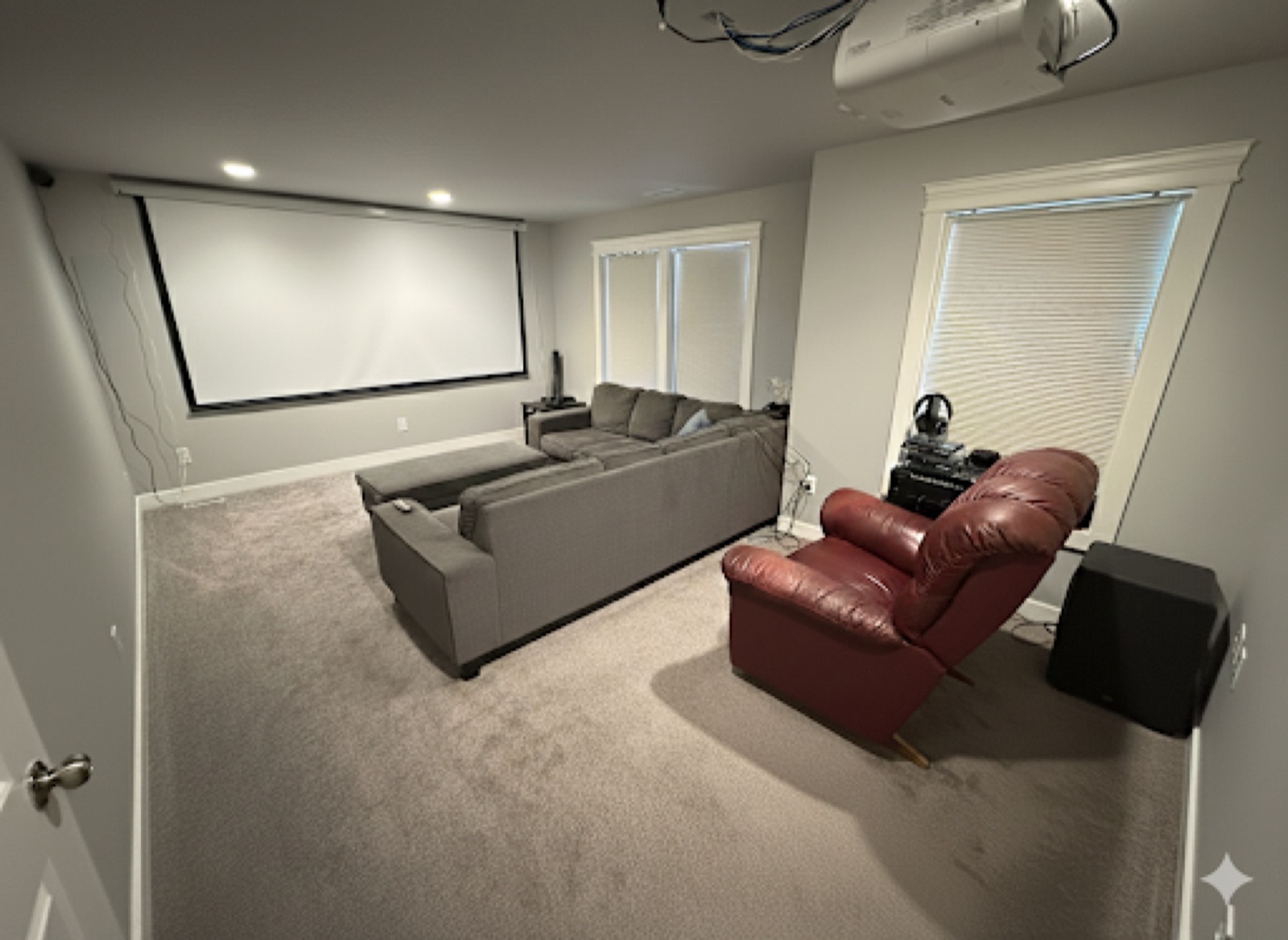
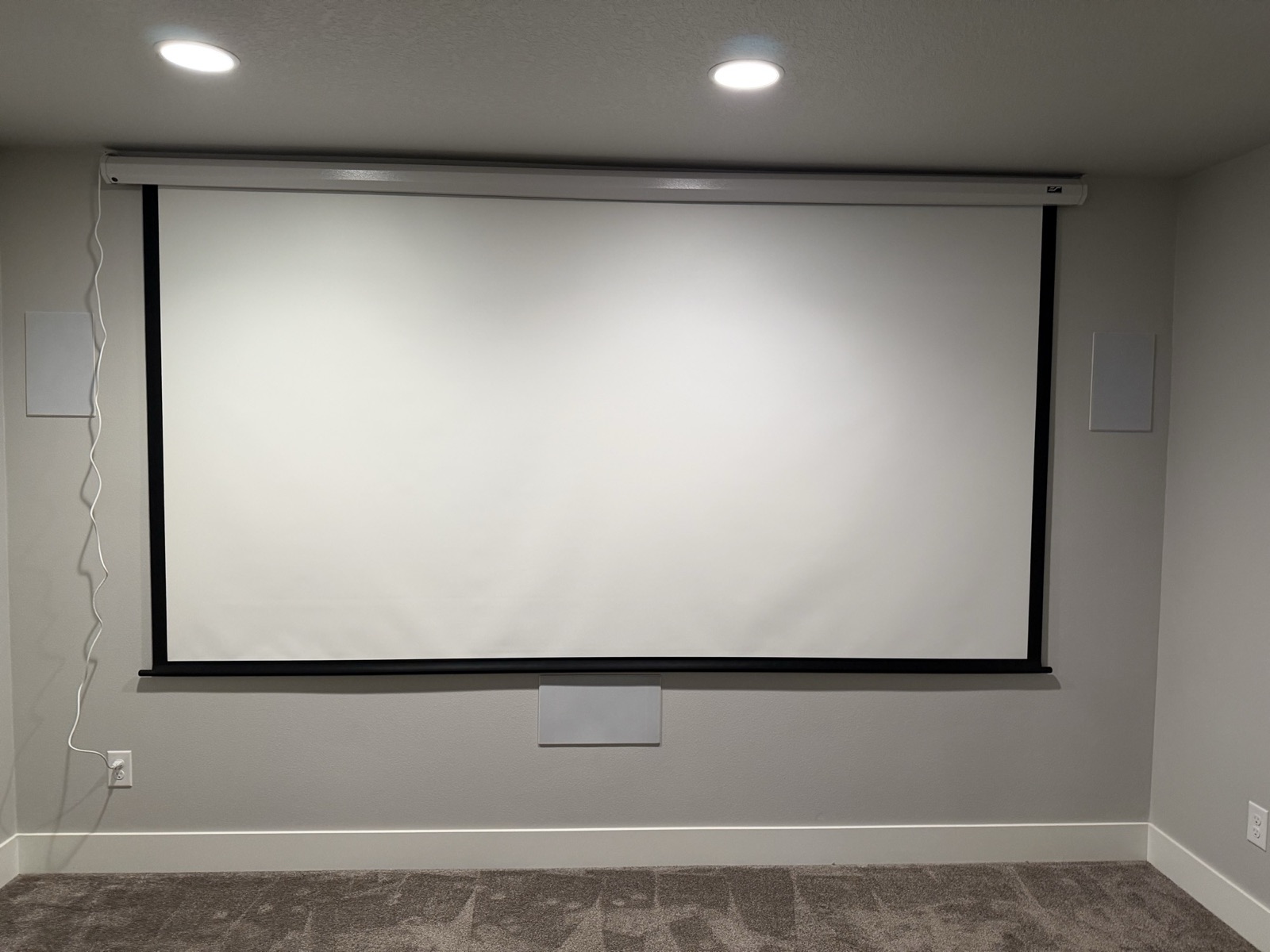
A purpose-built Dolby Atmos cinema — 135" motorized Elite Screens projection screen, 4K projector, Denon AVR-X4300H receiver, a Behringer iNUKE NU3000DSP amplifier, in-wall/in-ceiling speakers and a custom sub. The whole system stays with the house.
At a glance
A dedicated home theater with a 135" motorized screen (Elite Screens), a ceiling-mounted Epson 4K-enhanced projector, a Denon AVR-X4300H Atmos receiver, a Behringer iNUKE NU3000DSP power amp, in-wall/in-ceiling speakers, and a custom subwoofer. Seats six. The system stays with the house.
- Where
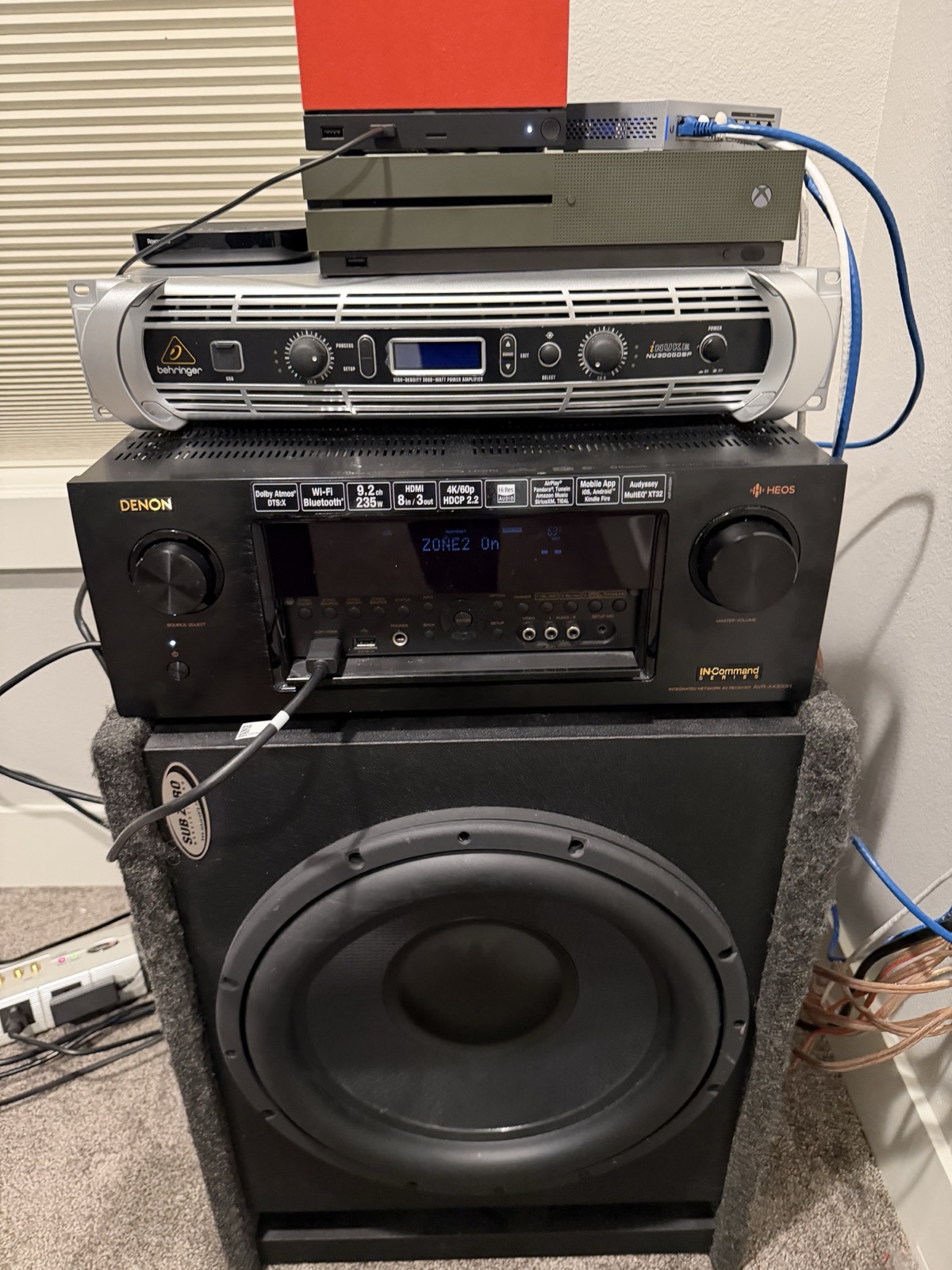
- The bonus room at the west (street) end of the upper floor. The electronics — receiver, amp, sub, and the top-of-stack devices (streaming box, game console, network switch, and a gaming PC) — sit on the carpet against the front wall (not in a rack); the projector is ceiling-mounted; speakers are built into the walls and ceiling.
- Must know
- You don’t need to understand any of it to watch a movie — see “Movie night in 3 steps” below. The subwoofer’s tuning lives inside the amplifier, not the sub itself — see the callout in the deep dive before anyone resets that amp.
- Status
- Fully installed and dialed in. The wall is wired for 5.1. Open: the screen's exact size and model, and where in the room the two rear-surround grilles actually sit.
2Everyday use
Movie night in 3 steps
- Power on the projector and receiver, then lower the screen with its own remote if it isn’t already down. The screen isn’t wired to the projector’s power — it’s a separate (but simple) button press, not a one-touch macro.
- Pick your source on the Denon receiver (streaming box, disc player, game console, etc.). The receiver switches both picture and sound to that input.
- Press play and dim the lights. Volume is the receiver’s volume knob/remote. That’s it.
Good to know
- The screen is motorized — it lowers and raises on a switch/remote. Let it finish travelling before starting; don’t stop it mid-way repeatedly.
- The subwoofer and low end are driven by a dedicated amplifier, so this room can get genuinely loud and deep. Ease into the volume the first time.
- For Dolby Atmos height effects you need Atmos content (many streaming titles and 4K discs) — the in-ceiling speakers do the overhead layer automatically when the source is Atmos.
- The electronics (receiver, amp, sub, and the top-of-stack devices) sit on the carpet against the front wall rather than in a closed cabinet — nothing to hide, just don’t stack anything on top of them or block the amp’s side vents.
Remotes and apps
This is mostly a remote-and-knob room rather than an app room. Three controls cover everything:
- The projector’s own remote — the Epson is controlled from it directly.
- The screen’s own remote — separate from the projector’s, and not linked to it (see “Good to know” above).
- Denon / HEOS app — the one app worth having. It controls the AVR-X4300H, changes inputs from your phone, and streams music to the receiver over HEOS multi-room.
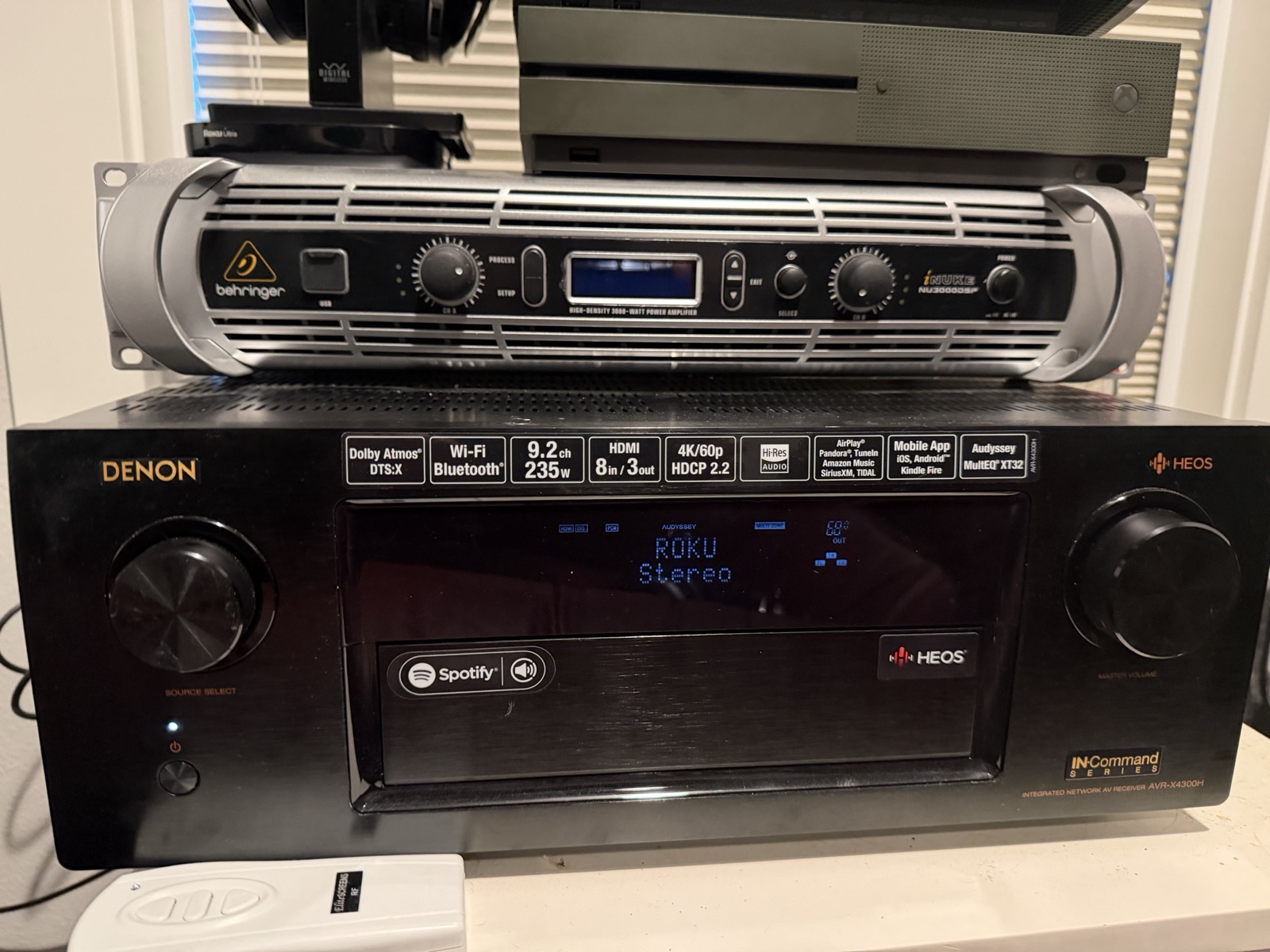
The receiver’s front display shows “Zone 2 On.” Zone 2 is a second independently-switchable audio output on the AVR-X4300H — what it feeds is still to establish, so find that out before deciding whether to leave it on or turn it off from Setup → Zone 2.
3Maintenance
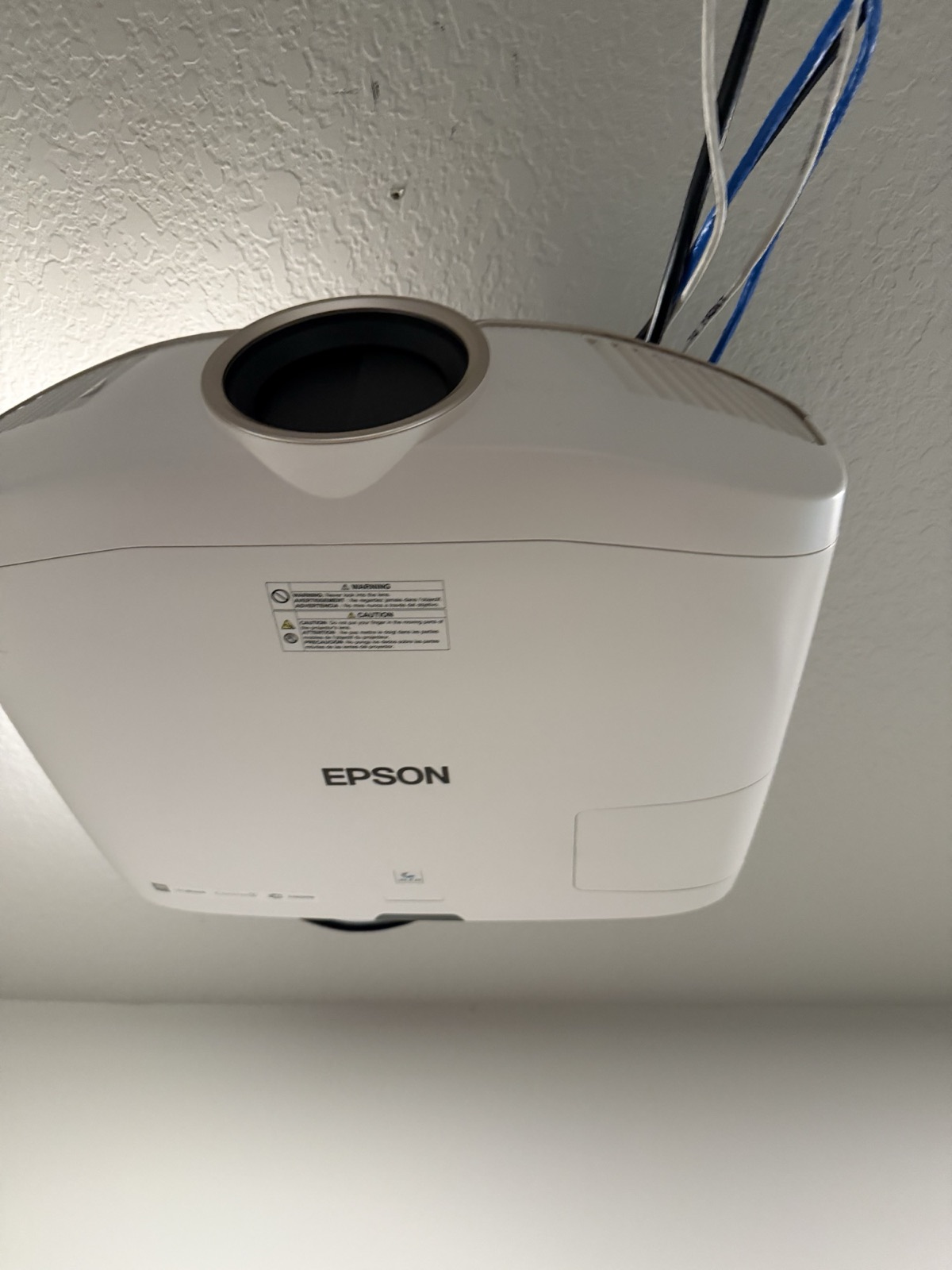
- Projector air filter: the Epson has a side air filter — vacuum/replace per the manual (roughly annually in a clean room). A clogged filter causes overheating and shortens lamp life.
- Lamp hours: this is a lamp projector, not laser — the bulb is a wear item. Lamp life in this room has been remarkable: this is roughly the third lamp since the 2017 build. The current lamp is healthy, and a spare lamp is on hand and stays with the house — expect years of use before it is needed. Record current lamp hours + lamp part number at walkthrough.
- Dust and airflow: the Denon receiver, the Behringer iNuke amp, and the sub sit loose on the carpet, not in a ventilated rack — keep the carpet in front of and behind the stack clear, don’t stack boxes or blankets on top of the amp, and vacuum around (not over) the gear rather than under it.
- Screen: a motorized screen is low-maintenance; just don’t force it or run it repeatedly against a jam.
Don’t touch the iNuke’s DSP settings casually
4Troubleshooting
- Picture but no sound (or vice-versa): almost always the receiver is on the wrong input, or the projector and receiver are set to different sources. Set both to the same source.
- No picture at all: confirm the projector is powered and not still warming up (Epson lamps take ~30s), the screen is down, and the receiver’s HDMI output is going to the projector.
- No Atmos / no overhead sound: the source content must be Atmos, and the receiver must show an Atmos/DTS:X format on its display. Standard stereo/5.1 content won’t light up the ceiling speakers.
- Sub too boomy, too weak, or silent: the sub is a passive driver with no controls of its own — its crossover, level, and EQ all live in the Behringer iNuke amp’s saved DSP preset. Small changes on the iNuke go a long way; don’t reset the iNuke to defaults to troubleshoot this, since that erases the preset the sub depends on. If the sub goes silent, check the iNuke is powered and its preset is still loaded before assuming the driver has failed.
- Remote does nothing: replace remote batteries; confirm you’re pointing at the right device (a universal/room remote may need the right “activity” selected first).
5Specs & identity
| Model | Epson PowerLite Home Cinema 5040UB (4K-enhanced 3LCD) to confirm — the model/serial plate is on the underside of the ceiling-mounted unit |
|---|---|
| Mount | Ceiling-mounted, concealed wiring |
| Serial number | owner's edition |
| Lamp hours | To gather — from the projector menu |
| Consumable — lamp | Epson lamp for 5040UB confirm part # |
| Spare lamp | A spare/replacement lamp is on hand and stays with the house. Lamp life in this room has been strong — this is roughly the third lamp since the 2017 build — and the current lamp is healthy. |
| Consumable — air filter | Epson air filter for the 5040UB series |
| Receiver | Denon AVR-X4300H — IN·Command series, 9.2-channel (125 W/ch, 8Ω 2ch driven), Dolby Atmos / DTS:X, 8 HDMI in / 3 out (4K/60p, HDCP 2.2), Wi-Fi/Bluetooth, HEOS, Audyssey MultEQ XT32. |
|---|---|
| Receiver serial | owner's edition |
| Zone 2 | Currently switched on (front display reads “ZONE2 On”). What it feeds is still to establish — ask at walkthrough before changing it. |
| Power amp | Behringer iNUKE NU3000DSP — high-density 3000 W class-D power amplifier with onboard DSP (crossover, EQ, delay, limiter). Dedicated entirely to the subwoofer — its only job in this system is driving that one driver, not general speaker amplification. |
| Speaker layout | Three in-wall/in-ceiling grilles are visible in the room (L/C/R around the screen). The termination plate wires exactly 5.1 — see “Wiring & channel map” below — so there is a left/right rear surround pair whose grilles have not been located in the room. To-gather: locate and photograph the rear-surround grilles. There are no Atmos height channels wired to this plate. |
| Speaker makes/models | To gather — the in-wall grilles are unbranded/paintable, so brand and per-position model are not visible from the room. |
| Construction | A custom build: a very large, carpet-wrapped Sub Zero Manufacturing enclosure (a car-audio-style box, 12"–15" driver) that is frankly utilitarian, wrapped around a high-end passive driver. The driver was always meant for a much better box than it got — a credible upgrade opportunity for an AV enthusiast, not a flaw to hide. It has no built-in amp or controls of its own. Full driver and box specs to gather. |
|---|---|
| Amplification | Driven entirely by the Behringer iNUKE NU3000DSP amp above — a full 3000 W amp dedicated solely to this one driver, its only job in the system. The sub’s crossover point, level, and EQ all live as a saved preset in the iNuke’s onboard DSP, not on the sub — see the maintenance callout before anyone touches that amp. |
| Driver make/size | To gather — not legible on the enclosure badge; full specs coming from the owner |
| Screen | 135" motorized drop-down projection screen, brand Elite Screens (logo badge on the end cap) confirm exact size and model |
|---|---|
| Screen power | Line-powered from a standard wall receptacle (cord visible running down the wall) — not a hardwired J-box |
| Screen control | Motorized, operated by its own dedicated remote (present and working). Not currently wired to the projector’s screen trigger — auto-drop when the projector powers on is a feature the hardware supports but that was never hooked up in this install. That trigger can be wired for one-touch automation, or the remote can simply be used by hand — either works. |
| Screen material | Solid matte white (not acoustically transparent) — the center speaker sits below the screen, not behind it |
| Seating | Comfortable seating for six |
| Equipment placement | The receiver, amp, sub, and consoles sit loose on the carpet against the front wall — there is no equipment rack or cabinet. |
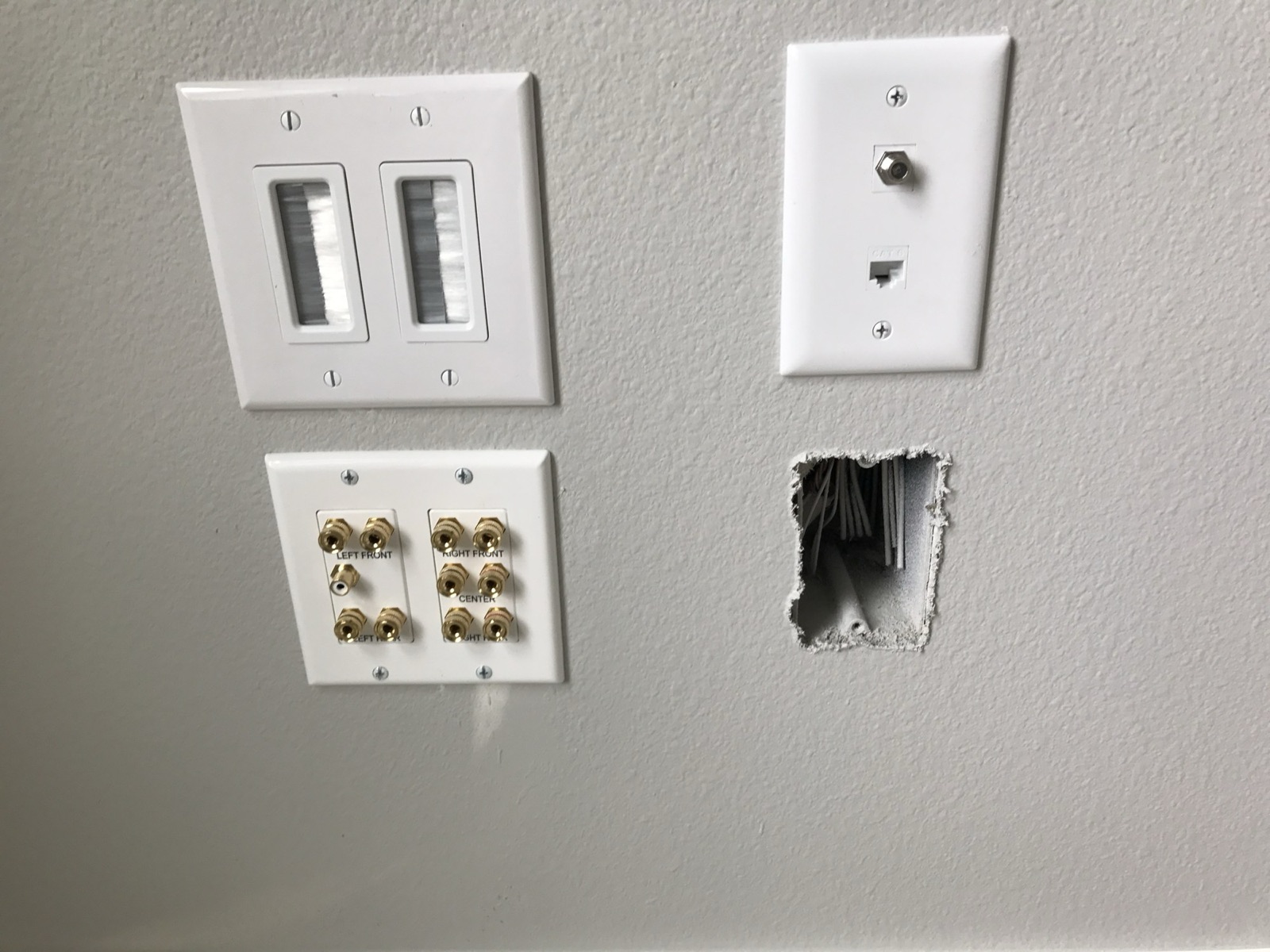
| Cable-termination point | A cluster of four wall plates at the screen wall: a Cat6 + coax plate, a duplex receptacle, a brush cable pass-through (carrying the projector’s HDMI/Cat6/video run), and a multi-channel speaker binding-post plate. |
|---|---|
| Speaker binding-post plate | The plate is engraved (not just numbered) with five channel names — LEFT FRONT, RIGHT FRONT, CENTER, LEFT REAR, RIGHT REAR — each a landed positive/negative binding-post pair, plus one unlabelled white RCA jack for the subwoofer (LFE) line. That is exactly five channels plus a sub — 5.1, and only 5.1: no surround-back or Atmos-height pairs terminate here. Only three grilles (L/C/R around the screen) are visible in the room today; the left/right rear pair's grilles are still to be found and photographed. |
| Receiver vs. wiring | The Denon AVR-X4300H is a 9.2-channel-capable receiver, but the in-wall wiring only terminates 5.1. The receiver's remaining channels are real headroom, not additional connected speakers — Atmos height effects would need new in-ceiling wiring pulled, or a wireless surround/height add-on kit, to actually produce sound. |
| Channel map | The plate's engraving is the wiring diagram: top-left pair = LEFT FRONT, top-right = RIGHT FRONT, middle pair = CENTER, bottom-left = LEFT REAR, bottom-right = RIGHT REAR, RCA jack = subwoofer. The wiring dates to the original May 2017 builder/AV rough-in, not a later retrofit. Still to-gather: a photo of where the two rear-surround grilles actually sit in the room, and a functional check that both rear channels play — a correctly labelled run can still be dead or mis-terminated at the far end, and only listening to it will rule that out. |
6Documents & links
- Epson 5040UB — support & manuals
User guide, lamp and filter part numbers. - Epson Home Cinema 5040UB — user guide (PDF)
Official files.support.epson.com. Model still to confirm from the unit’s plate. - Denon AVR-X4300H — manuals (manuals.denon.com)
Model-specific owner’s manual (PDF download) and browsable setup/troubleshooting sections. Archived locally — exact match, model silkscreened on the faceplate. - Denon AVR-X4300H — official product page (archived)
Denon’s own archive page for this now-discontinued model; confirms specs. - Denon HEOS
Multi-room streaming app for the Denon. - Behringer — support & downloads
Search “iNUKE NU3000DSP” for the manual and the DSP/preset software — needed to read or rewrite the sub’s crossover/EQ settings. (Behringer’s deep product-page links for this older model have moved/broken; the root support search is the reliable path.) - Behringer iNUKE NU6000DSP/NU3000DSP/NU1000DSP — user manual (PDF)
Covers all three amps in one manual. Archived via archive.org (live behringer.com/musictribe.com links are 404 post-redesign). Exact match.
Section 8Technical reference ExpandCollapse
The engineering layer — for a buyer's technician, or a curious owner.
For the AV enthusiast: this is a proper dedicated theater — projector, external amplification for the low end, and a built-in Atmos speaker array — not a soundbar-and-TV setup.
Owner's edition
Full details in the owner's edition — serial numbers, configuration and identity details continue in the complete manual, handed to the buyer at closing.
Signal chain
Sources → Denon AVR-X4300H (HDMI switching + Atmos/DTS:X decoding and Audyssey room correction) → HDMI out to the ceiling-mounted Epson for video; speaker-level out to the in-wall/in-ceiling array, with the subwoofer’s low end handled by the dedicated Behringer iNUKE NU3000DSP amplifier. The receiver’s 9.2 processing plus the ceiling speakers is what enables the Atmos height layer.
The custom sub: a high-end driver in a box that undersells it
The subwoofer is a custom build, and it is worth being candid about what that means: a very large, utilitarian, carpet-wrapped Sub Zero Manufacturing enclosure — a car-audio-style box — built around a genuinely high-end passive driver. The driver was always meant for a much better box, and it deserves one. That is not a knock on the system as it stands — it plays loud and clean, driven by a full-size dedicated amp — it is a straightforward upgrade path: the hard part, a good driver, is already done. Full driver and box specs still to gather.
Why the external amp — and why it’s a single point of failure for the sub
The Behringer iNUKE NU3000DSP is a full 3000 W outboard amplifier dedicated entirely to the subwoofer — driving that one driver is its only job in this system, and pro-style outboard amplification like this gives the sub far more headroom than a receiver’s internal amp would, which is why the room stays clean and effortless at reference volume. The trade-off: the sub itself has no amp, crossover, or EQ of its own. Every bit of its tuning — crossover frequency, level, EQ curve — is a saved DSP preset inside the iNuke. Swap the amp, reset it to factory, or lose that preset, and the sub itself gives you no way to get back to how it sounded.
To-gather: export the iNuke’s DSP preset
Not a rack — equipment on the carpet
The receiver, amp, sub, and the top-of-stack devices sit stacked directly on the carpet against the front wall, not in an equipment rack or ventilated cabinet. It works as it stands, but a rack or an open shelf (even a simple one) would improve airflow around the iNuke and Denon — both run warm — and get the gear up off carpet fibers and out of the path of a vacuum. Worth considering as a low-cost upgrade, not a requirement.
The wall is wired for 5.1 — and the Denon has headroom it isn't using
The speaker plate is engraved, not just numbered, with five channel names — LEFT FRONT, RIGHT FRONT, CENTER, LEFT REAR, RIGHT REAR — plus one unlabelled white RCA jack for the subwoofer line. That is 5.1, and only 5.1: no surround-back pair and no Atmos-height pair terminates at this plate. The wiring was pulled and terminated in May 2017, as part of the original builder/AV rough-in, not a later retrofit.
There is a mismatch worth stating plainly: the Denon AVR-X4300H is a 9.2-channel-capable receiver, but the house is wired for 5.1. The receiver's remaining channels are genuine headroom — useful if a future owner ever pulls new in-ceiling wiring for Atmos heights, or adds a wireless surround/height kit — but today they aren't driving any speaker that exists. Only three grilles are visible in the room (L/C/R around the screen); the wired left/right rear pair exists, but its grilles have not yet been found or photographed.
Owner's edition
Full details in the owner's edition — serial numbers, configuration and identity details continue in the complete manual, handed to the buyer at closing.
Top of the stack
The installed system — projector, screen, receiver, amplifier, speakers and subwoofer — stays with the house. Sitting loose on top of the equipment stack are four things that are not part of it: a Roku streaming device, an Xbox, a small network switch, and an orange-faced Steam Machine (a compact gaming PC). The network switch is part of the room’s wired network — see the Network page for the drop this stack lands on. Which of the other three came with the house is listed on What Conveys.
What to gather to finish this page
- The projector’s serial/lamp-hours from the underside plate (needs the unit dismounted or a mirror).
- The screen’s exact size and model. (Screen control is settled: a working dedicated remote, not wired to the projector’s trigger — see specs.)
- The in-wall/in-ceiling speaker brand and per-position models (the grilles are unbranded).
- Where the two rear-surround grilles sit in the room — the engraved plate names the pair, so the wiring exists; only the grilles are unlocated — plus a functional check that both rear channels play.
- Full driver and box specs for the subwoofer, from the owner.
- An exported/photographed copy of the iNuke’s DSP preset for the subwoofer.
- What the Denon’s Zone 2 output feeds, and whether it should stay on.