05·RB
Runbooks & Troubleshooting
Scenario-driven, plain-language: symptom → check → fix → when to call a pro (and who).
Something is wrong and you want it fixed. Every page in this part is a short decision path you can follow while standing in the dark holding a phone — no prior knowledge of this house required.
Before anything else
Triage — start here if you do not know which runbook you need
Find the thing that is wrong. The middle column is what to do in the next sixty seconds; the right column is the full runbook.
| What is happening | Do this now | Runbook |
|---|---|---|
| The power is out in the neighborhood | Probably nothing — the Powerwalls should already be carrying the house. Open the Tesla app to confirm, and ease off the big loads. | Power outage |
| The whole house is dark | Different problem: the backup did not carry, or the main is off. Check the Tesla app, then the main panel. | Power outage |
| One room or a few outlets are dead | Look for a tripped breaker in the panel and a tripped GFCI button on a nearby outlet. | Breaker trips |
| Water is coming out of something | Turn off the nearest shutoff — under the sink, behind the toilet, or the main on the garage’s south wall. Stop the water first, diagnose second. | Water leak |
| No internet | Look at the fiber box (ONT) and the gateway lights before touching anything else. | Internet down |
| The house is cold | Start at the Ecobee: is the screen on, is it in Heat, is the target above the room temperature? | No heat |
| The garage door goes down then reverses | Clear whatever is in front of the two safety sensors near the floor and wipe their lenses. | Garage door |
| Solar production looks wrong | Compare it to the same week last year, not to last month. Season explains most of it. | Solar looks low |
| You smell gas | Leave the house. Do not touch a switch, a phone, or the gas valve on your way out. Call from outside. | 911, then NW Natural 1-800-882-3377 |
| You are leaving town | Nothing is wrong — this is the pre-flight checklist so nothing goes wrong while you are gone. | Going on vacation |
The three shutoffs
Every owner of this house should be able to find these three in the dark, and it is worth walking to each of them once on a calm afternoon. They are the most consequential facts in this manual.
| Shutoff | Where it is | What it does |
|---|---|---|
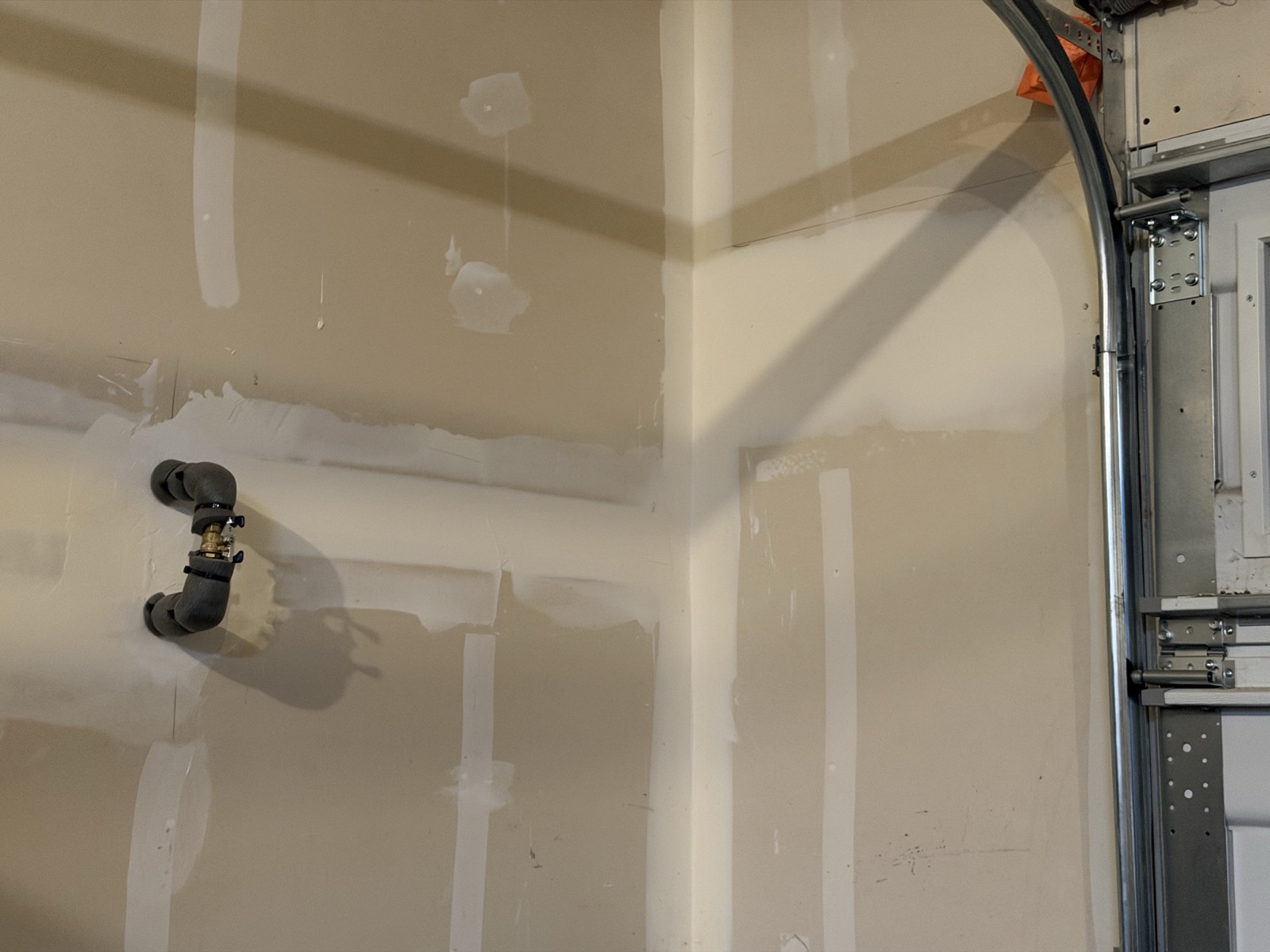
| Main water | The garage’s south wall, immediately beside the main vehicle door, about 5½–6 feet up. A brass lever-handle ball valve on an insulated riser — a quarter turn, so the lever sits across the pipe. Photographed below. | Stops all water to the house. This is the one for a burst pipe or any leak you cannot isolate at the fixture. |
| Main electrical | Inside the garage on the north wall, about two feet from the man door — indoors and dry. The rest of the service equipment (Powerwalls, inverters, meters, solar disconnect) is directly through that wall on the outside. photo + breaker schedule | Kills power to the house. Note that this house has Powerwalls: killing the main does not necessarily leave everything dead — see the power outage runbook. |
| Gas | meter and valve location to confirm; photo to add | Shuts off gas to the range, the furnace, the fireplace and the tankless water heater. If you smell gas, leave first and call from outside — do not go hunting for the valve. |
The numbers worth having in your phone
These are the four calls that actually get made from this address. The full contact and provider tables — police non-emergency, poison control, 811, the sewer district, the hauler — are in Part 6 — Reference.
| Who | Number | When |
|---|---|---|
| Emergency | 911 | Fire, gas smell you can smell outdoors, downed line, injury, sparking. Always first. |
| Clark Public Utilities — PowerLine | 360-992-8000 | Report a power outage. Do it even if your lights are on: the Powerwalls hide the outage from you, not from the neighborhood. |
| NW Natural — 24-hour gas emergency | 800-882-3377 | Any smell of gas. Leave the house first, then call from outside (or call 911). |
| City of Ridgefield — after-hours water | 360-887-6002 | A water emergency on the city’s side — the meter, the street, no water at all. |
Also worth knowing
How to use a runbook
Each runbook is written the same way, on purpose, so that once you have used one you know how to use all of them:
- The opening line tells you what is probably happening — and, usually, that it is less serious than it feels. Read it before you touch anything.
- “First, check” is a numbered list in order. The order is deliberate: cheapest and most likely first, most expensive and least likely last. Do them in order and stop when the problem goes away. Roughly four out of five household faults are solved before step three.
- The tables are the branch points. Once you know which version of the problem you have, find your symptom in the left column and read across.
- The red box is the stop sign. Every runbook ends with “stop and call a pro when…”, and it names who — the utility, an electrician, a plumber, or the vendor. Knowing which of those to call is most of the battle.
- The last section links to the system pages. The runbook gets you through the incident; the system page explains the equipment.
Two rules that hold in every runbook
The runbooks
Eight of them, listed below. Each one stands alone — you never need to have read the others. Seven cover something going wrong; the eighth, Going on vacation, is the only one you use when nothing is wrong at all.