02·SEC
Security & Access
Three connected devices guard the house’s entries: a Schlage Encode Plus WiFi deadbolt on the front door, a Eufy Security 2K dual-cam video doorbell, and a Linear/GoControl garage door controller. Each has its own app, and each still works from the keypad, the button, or the wall switch with no app at all.
At a glance
A Schlage Encode Plus WiFi deadbolt on the front door — keypad code, app, Apple Watch or iPhone, or a physical key. A Eufy Security 2K dual-cam video doorbell, wired into the house’s original doorbell circuit and backed by a eufy HomeBase. And a Linear/GoControl Z-Wave garage door controller that adds remote open/close and status reporting to the existing opener. Pressing the doorbell rings the original wall chimes that came with the house, plus a chime built into the HomeBase.
- Where
- The deadbolt is on the front door, on the west face of the house beside the garage. The doorbell is at the same entry. The garage controller is wall-mounted near the garage door opener, wired to a nearby outlet, with a wireless sensor on the door itself. The house’s dormant alarm panel is a separate system with its own page.
- Must know
- The deadbolt runs on four AA batteries. When they go flat the keypad, the app and tap-to-unlock all go with them, and the physical key cylinder beside the keypad is the only way in — so keep a key somewhere reachable without getting into the house first. The doorbell records locally to its HomeBase, encrypted, with no subscription. The garage controller is Z-Wave, not WiFi: it cannot reach an app on its own and depends on a hub being on the network.
- Status
- Installed and operating. Open: the HomeBase generation, the garage controller’s Z-Wave hub, and exact model numbers for the doorbell and the garage controller.
2Everyday use
None of these devices require an app for daily use — the keypad takes a code, the doorbell rings your phone, and the garage door opens the way it always did, plus a status you can check remotely.
Schlage Encode Plus deadbolt
- Touch the dark panel to wake the keypad, enter your code, then press the button with the lock icon. You do not need a code just to lock the door — a one-touch lock button works with the door closed.
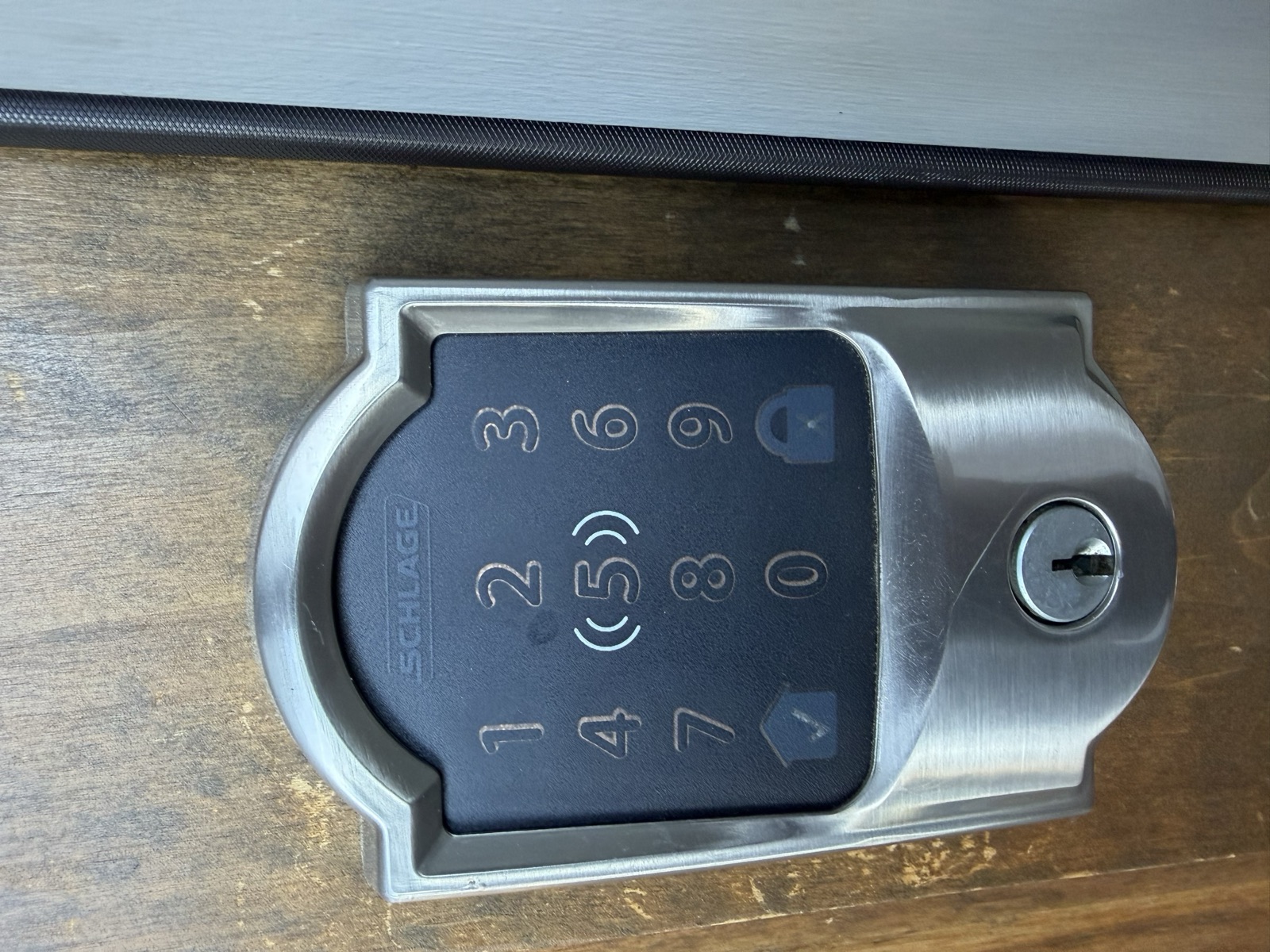
- Hold an iPhone or Apple Watch to the wave mark at the centre of the keypad to unlock with an Apple home key — no app to open, no code to type, and it works with the phone locked.
- From the Apple Home app, or from the Schlage Home app, tap Lock or Unlock on the lock’s tile.
- A standard key cylinder sits beside the keypad as a backup — for a dead battery, a WiFi outage, or simply not having your phone.
Why this lock, specifically
The keypad numbers aren’t in phone order — on purpose
Eufy video doorbell
- A visitor triggers a phone notification through the Eufy Security app. Tap it for live video — from both the main 2K camera and the lower angle that frames packages on the step — and two-way talk.
- The doorbell is wired into the house’s original doorbell circuit, so pressing it also rings the original wall chimes — exactly like it always did — in addition to the phone notification and a chime built into the HomeBase.
- Recordings save locally and encrypted to the HomeBase at no monthly cost; open the app’s Events tab to play them back.
Garage door
- Open or close it remotely from whichever smart-home app is paired to the house’s Z-Wave hub (which hub — to confirm) — the same app shows whether the door is currently open or closed, reported by a wireless sensor on the door.
- The original wall pushbutton and any existing remotes keep working exactly as before — the controller listens in on the opener’s circuit, it doesn’t replace it.
The apps
Three devices, three apps, plus Apple Home for the lock. They do not talk to each other, and none of them is required for the doors to work — every one of these devices does its main job with the phone left in a pocket.
- Schlage Home (iOS/Android) — the lock’s own app, and where access codes live: up to 100 per lock, each one nameable, schedulable, and revocable on its own. It also shows the lock history and the battery level, and it needs no hub of any kind.
- Apple Home (iOS/macOS) — the Encode Plus also appears as a HomeKit lock: Siri, the Home app, an Apple Watch complication, home keys in Wallet, and automations. Remote control and automations from Apple Home need a home hub — an Apple TV or a HomePod — somewhere in the house; without one, Apple Home still works when the phone is on the house WiFi.
- Eufy Security (iOS/Android) — manages the doorbell and its HomeBase: live view, event history, and notification settings. The physical chiming (original wall chimes plus the HomeBase’s own chime) rings on its own wiring and hardware and isn’t something the app turns on or off.
- A Z-Wave hub app (name to confirm) — the Linear/GoControl garage controller has no app of its own. It speaks Z-Wave to a hub (common examples: SmartThings, Hubitat, a security panel) and that hub is what puts open, close and status into a phone app.
Apple household or not, nothing is lost
Access codes
Codes are the everyday way people other than you get in — a house-sitter, a cleaner, a contractor, a family member who does not want an app. Each is created and named in the Schlage Home app, and each can be given a schedule (weekday mornings only, say) or simply deleted when it is no longer wanted. Code changes sync from the app down to the lock over WiFi; the code table itself lives in the lock’s own memory, so a revoked code stops working at the door whether or not the internet is up.
- Give each code to one person and name it for them. A shared code tells you nothing when you look at the history.
- Retire a code when the reason for it ends, rather than leaving it live indefinitely.
- The lock holds up to 100 codes, so there is never a reason to reuse one.
Putting these devices into accounts of your own, and clearing access that came with the house, is a one-time step — see the Appendix — Taking Ownership.
What this page covers, and what sits next to it
3Maintenance
Schlage deadbolt
- Batteries: four AA alkaline cells, replaced from the interior side. Schlage estimates roughly six months of typical use per set.
- Low-battery warning: a flashing red battery icon on the keypad, plus an alert in the Schlage Home app and in Apple Home — replace promptly rather than waiting for a dead lockout.
- Battery type matters: Schlage specifically advises against lithium cells and rechargeable NiMH batteries — NiMH’s lower voltage (1.2V vs. 1.5V) reads as partially drained from the day you install it.
- Keep the NFC target clean: the tap-to-unlock area at the centre of the keypad works through a bit of grime, but a wipe now and then keeps home-key taps first-time reliable.
Eufy video doorbell
- Power: wired continuously from the house’s existing doorbell wiring — there is no battery to charge or replace day to day, and no low-battery routine to keep on top of.
- Lens care: wipe the two lenses free of dust, spiderwebs, and water spots occasionally — the wide 160° lens is the first thing to show a smudge in video.
Garage controller
- Essentially maintenance-free — it is a small transceiver module, not a motor or moving part.
- Wireless door sensor: the tilt sensor mounted on the door itself runs on a coin-cell battery (CR2032 on this product family) — if the app starts reporting stale or missing open/closed status, that battery is the first thing to check.
- Worth a periodic check regardless of this controller: the garage door opener’s own safety-reverse photo-eye sensors (near the floor on each side of the door) should be clear of dust and cobwebs — that is an opener-level safety feature, not something this controller manages.
4Troubleshooting
| Device / symptom | First checks | When to escalate |
|---|---|---|
| Schlage — keypad unresponsive | Cold weather and low batteries are the two most common causes. Swap in four fresh AA alkaline batteries first. | Still dead after a battery swap → the keypad module itself; contact Schlage support. |
| Schlage — tap-to-unlock stopped working | Confirm the home key is still in the Wallet on that device, and that the device is the one the key was issued to. A lock that was removed from a home, or reset, revokes every home key it ever issued. | Home key present in Wallet but the lock ignores it → remove the lock from Apple Home and re-add it, which reissues keys to the household. |
| Schlage — won’t connect / shows offline in app | It lost WiFi. Re-run WiFi setup for the lock in Schlage Home. If the whole house network is down, fix that first (see Network page). | Reconnects to WiFi but still won’t sync → try removing and re-adding the lock in the app. |
| Schlage — shows “No Response” in Apple Home only | The Schlage Home app and the keypad are the test: if both work, the lock is fine and the problem is on the Apple side. Check that the home hub (Apple TV or HomePod) is powered and online. | Hub online and the lock still unresponsive in Apple Home → remove the accessory and add it again. |
| Schlage — deadbolt is hard to turn / binds | Usually door or strike-plate alignment, not the lock — check that the door hasn’t settled or swollen with weather. | Persistent binding → a door/frame adjustment, not a lock problem; call a locksmith or handyman. |
| Eufy — no notifications | Confirm the HomeBase is powered and shows online in the app, and the doorbell has signal to it (they talk over 2.4GHz WiFi/local link, not directly to your router). | HomeBase online but doorbell still silent → check notification settings in the app before assuming a hardware fault. |
| Eufy — neither chime rings | Two separate chimes can sound on a press: the original wall chimes (wired into the house’s existing doorbell circuit) and the HomeBase’s own built-in chime. If neither rings but the phone notification still arrives, check that the HomeBase is powered on and check the app’s chime/notification settings before suspecting the wiring. | Phone notification also missing, or wiring visibly disturbed → likely a wiring fault behind the button; an electrician or Eufy support can trace it. |
| Garage — app shows wrong open/closed status | Check the wireless tilt sensor on the door (battery, and that it is still firmly attached) — that sensor is the source of the status shown in the app. | Status still wrong after a sensor check → re-pair the sensor to the controller per its manual. |
| Garage — app can’t open/close the door | Confirm the hub itself is online first (a Z-Wave hub outage looks identical to a garage-controller failure). The original wall button should still work regardless — use it to rule out the opener/motor. | Wall button works but the app never does → a Z-Wave inclusion/hub issue, not the opener. |
Don’t factory-reset any of these in a panic
5Specs & identity
| Type | Schlage Encode Plus Smart WiFi Deadbolt — built-in WiFi, no hub required for its own app; Apple Home and Apple home key (NFC tap-to-unlock) support |
|---|---|
| Model family | BE499 series. HomeKit support is what identifies it: within the Encode family only the Encode Plus (BE499) speaks Apple Home — the plain Encode (BE489) does not, and Schlage does not offer an upgrade path. Exact trim/finish SKU to confirm from the label under the battery cover. |
| Finish | Satin nickel |
| Door installed on | The front door, on the west face of the house beside the garage |
| Smart-home platforms | Apple Home (Siri, home keys, automations — a home hub such as an Apple TV or HomePod is needed for remote control and automations) plus the Schlage Home app, which needs no hub |
| Serial number | owner's edition |
| Physical key backup | Standard re-keyable cylinder, beside the keypad |
| Consumable | 4× AA alkaline batteries (avoid lithium or rechargeable NiMH) |
| Apps | Schlage Home and Apple Home (iOS/Android; Apple Home is iOS/macOS only) |
| WiFi network | password on the credentials sheet |
| Schlage Home account login | see credentials sheet |
| Access codes | see credentials sheet |
| Type | Eufy Security Video Doorbell — dual-camera, 2K main lens + secondary package-view lens, 160° wide view |
|---|---|
| Exact model | to confirm — product family is the “Video Doorbell Dual (2K)”, installed wired in this house |
| Mount location | At the front entry, on the west face of the house |
| Power | Wired — powered continuously from the house’s existing doorbell wiring, not battery-dependent for daily use |
| Chime | Rings the house’s original wall chimes (wired into the existing doorbell circuit) plus the HomeBase’s own built-in chime — two chimes per press |
| HomeBase generation | to confirm — which eufy HomeBase generation |
| HomeBase location | In the office, next to the front door. It can be relocated anywhere in the house — it needs power and a connection back to the house network, nothing else. |
| Local storage | Encrypted on-device HomeBase storage; no monthly subscription required for local recording |
| App | Eufy Security (iOS/Android) |
| WiFi network | password on the credentials sheet |
| Eufy Security account login | see credentials sheet |
| Type | Linear/GoControl Z-Wave garage door opener controller — adds remote control and open/closed status to the existing opener |
|---|---|
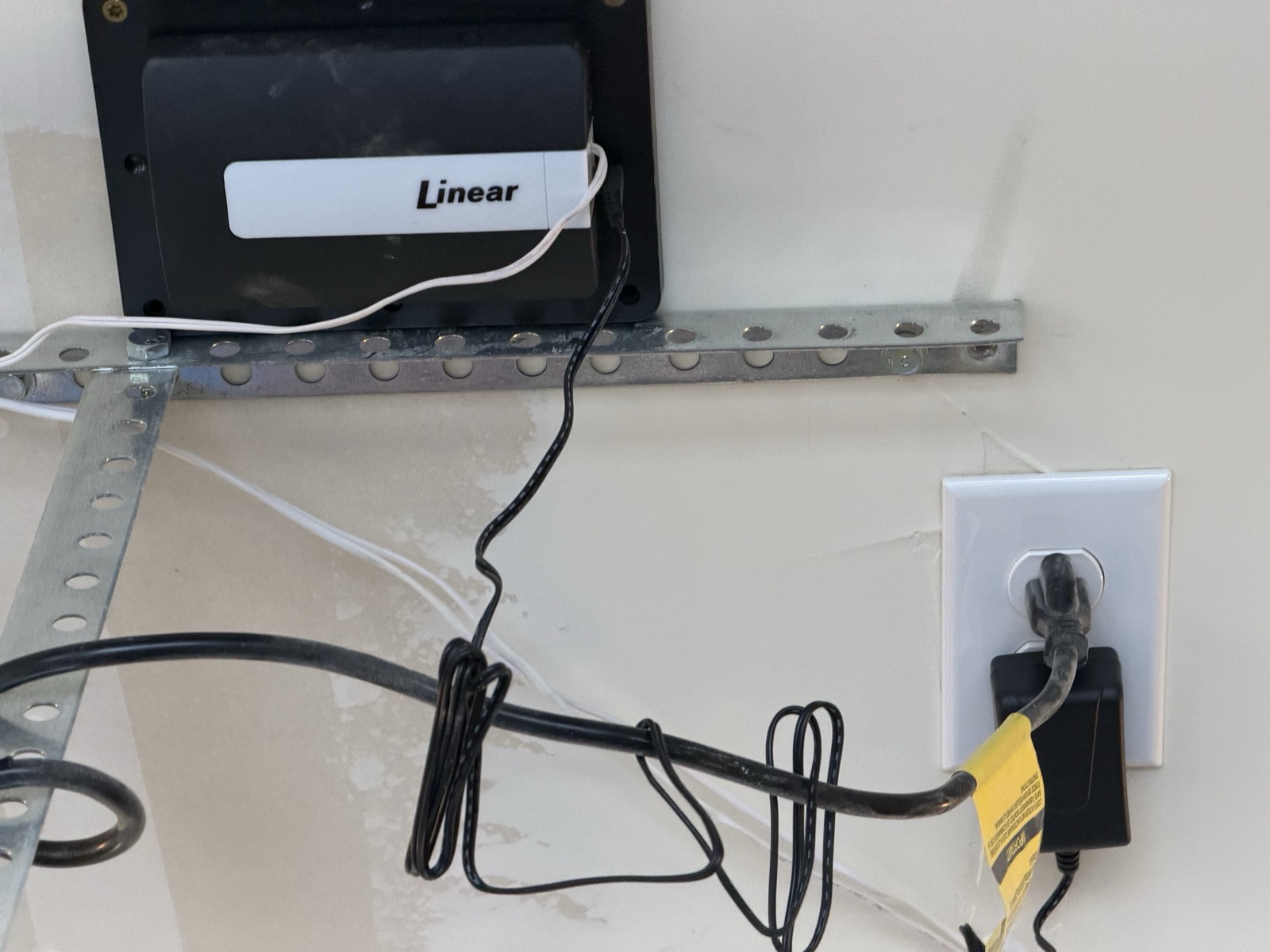
| Exact model | to confirm — the label reads “Linear” only; the model number (GD00Z-4/5/8-GC or similar) is not legible |
| Garage door opener it controls | to confirm — make and model of the opener/motor in the garage |
| Z-Wave hub controlling it | to confirm — no hub is documented elsewhere in this manual |
| Power | Plug-in AC transformer to a nearby outlet, wired low-voltage to the opener’s control terminals |
| Door position sensing | Wireless tilt sensor mounted on the door (coin-cell battery, CR2032 on this product family) |
| Protocol | Z-Wave (not WiFi on its own — see Deep dive) |
| Cameras fitted | One — the Eufy doorbell at the front entry, on the west face of the house. No other camera is installed anywhere on the property. |
|---|---|
| Spare camera cabling | A pair of ethernet cables hangs at the corner of the east wall of the main house body (ignoring the living-room bump-out), above the covered patio — a camera drop, cabled and left in place, with no camera on it. Anyone wanting a rear camera has the wiring already run. |
6Documents & links
Official manuals and support pages for each device. Local copies are archived in the owner’s edition, so this section works with no internet.
- Schlage Encode Plus — FAQs
Official FAQ for the Encode Plus, including Apple Home and Apple home key behaviour. - Schlage — Encode Plus: pairing with Apple HomeKit and the Schlage Home app
The pairing order, and when an Apple home hub is required. - Schlage — Apple home keys: how to use with Encode Plus
Setting up and using tap-to-unlock from an iPhone or Apple Watch. - Schlage — can the Encode (BE489) be upgraded to support Apple HomeKit?
Schlage’s own statement that the plain Encode has no HomeKit support and cannot be upgraded — which is what identifies this lock as an Encode Plus. - Schlage Residential support — factory reset a Schlage Encode lock
Returning the lock to factory defaults — the procedure, and what it erases. - Schlage — smart lock programming guides
Model-specific setup and programming guides. - Schlage — rekeying instructions (PDF)
Official rekeying-kit procedure for the physical cylinder — what a locksmith would otherwise do, whenever keys need to change. - Schlage Encode — quick start / installation guide (PDF)
Archived copy (the live schlage.com link redirects to a JS-only app). Covers the Encode platform’s mechanical installation and default-code label; the Encode Plus quick start is still to archive. - Apple — set up your HomePod, HomePod mini, or Apple TV as a home hub
What the house needs for remote control and automations from Apple Home. - Apple — securely control your Home accessories
Apple’s own guidance on reviewing and revoking who has access to a HomeKit accessory. - Eufy Security — support home
Guides, FAQs, and firmware for current Eufy Security devices. - Eufy — Video Doorbell Dual (2K) specifications
Official spec sheet — battery, storage, resolution. - Eufy Video Doorbell Dual (2K) — user manual (PDF)
Linked from official support.eufy.com. Identifies as “Video Doorbell Dual (Battery), Model T8213” — the same product family; this house’s unit is installed wired from the existing doorbell wiring. - Eufy — connect Battery Doorbell Dual to HomeBase 3
Pairing procedure, useful once the HomeBase generation is confirmed. - Eufy HomeBase 3 — user manual (PDF)
Via service.eufy.com — the HomeBase 3 manual, pending confirmation of which generation is installed here. - Linear GD00Z-4 — installation manual
Wiring, power specs, and Z-Wave inclusion for the GD00Z family. - GoControl GD00Z-4 — installation manual (PDF, via Z-Wave Alliance)
gocontrol.com is dead and Nortek rebranded to niceforyou.com with no GD00Z docs; this is the Z-Wave Alliance’s hosted copy of the manufacturer’s certification-submission PDF. Series-level. - Z-Wave Alliance — GD00Z-4 certified device manual
Official Z-Wave Alliance certification listing and manual.
Section 8Technical reference ExpandCollapse
The engineering layer — for a buyer's technician, or a curious owner.
For anyone who wants to know how these three actually talk to the network — and to each other (short answer: they mostly don’t).
Three devices, three radios
The Schlage lock and the Eufy doorbell are both WiFi-native: each is its own client on the house network (see the Network page), reaching its manufacturer’s cloud directly for remote and app functionality. Core local function does not depend on that cloud connection — the Schlage keypad locks and unlocks on its own logic with no WiFi at all, and the Eufy doorbell still detects motion and can chime and notify over its local link to the HomeBase.
The Encode Plus carries a second radio on top of that: a short-range link for Apple Home plus an NFC reader behind the wave mark on the keypad, which is what makes tap-to-unlock work. The NFC path is entirely local — an Apple home key is a credential held in the Secure Element of the phone or watch, presented directly to the lock. It works with the house internet down, with the lock off WiFi, and with a phone whose battery has entered power reserve.
Owner's edition
Full details in the owner's edition — serial numbers, configuration and identity details continue in the complete manual, handed to the buyer at closing.
Local vs. cloud dependence
- Eufy is the most self-sufficient of the three: video is processed and stored locally on the HomeBase (encrypted, no monthly fee) rather than relying on a cloud DVR. The app still needs the internet to notify your phone remotely, but the recordings themselves do not leave the house unless you choose to share them.
- Schlage keeps all locking logic on the lock itself — the code table lives in the lock’s own memory, and home keys are validated locally over NFC. WiFi and cloud are for remote app control and for syncing new codes without standing at the door.
- Apple Home adds a third path that is local-first by design: an iPhone on the house WiFi talks to the lock directly, and a home hub (Apple TV or HomePod) is what extends that to remote control and automations when nobody is home.
- The garage controller’s local behaviour is entirely a function of its hub: some hubs run automations locally even if the internet is down, others require the cloud for every command. Which applies here depends on which hub is in use.
Garage controller — compatibility and wiring
Owner's edition
Full details in the owner's edition — serial numbers, configuration and identity details continue in the complete manual, handed to the buyer at closing.
This controller family is compatible with the large majority of sectional garage door openers made after 1993, with one exception worth knowing: openers using a manufacturer’s proprietary rolling-code wall-button interface (Chamberlain/LiftMaster Security+ 2.0-style systems) are not supported the way a simple mechanical pushbutton interface is. This controller is installed and working, so the opener is compatible; recording the opener’s own make and model closes the loop and unlocks its own manual.
Eufy doorbell — what’s in the housing
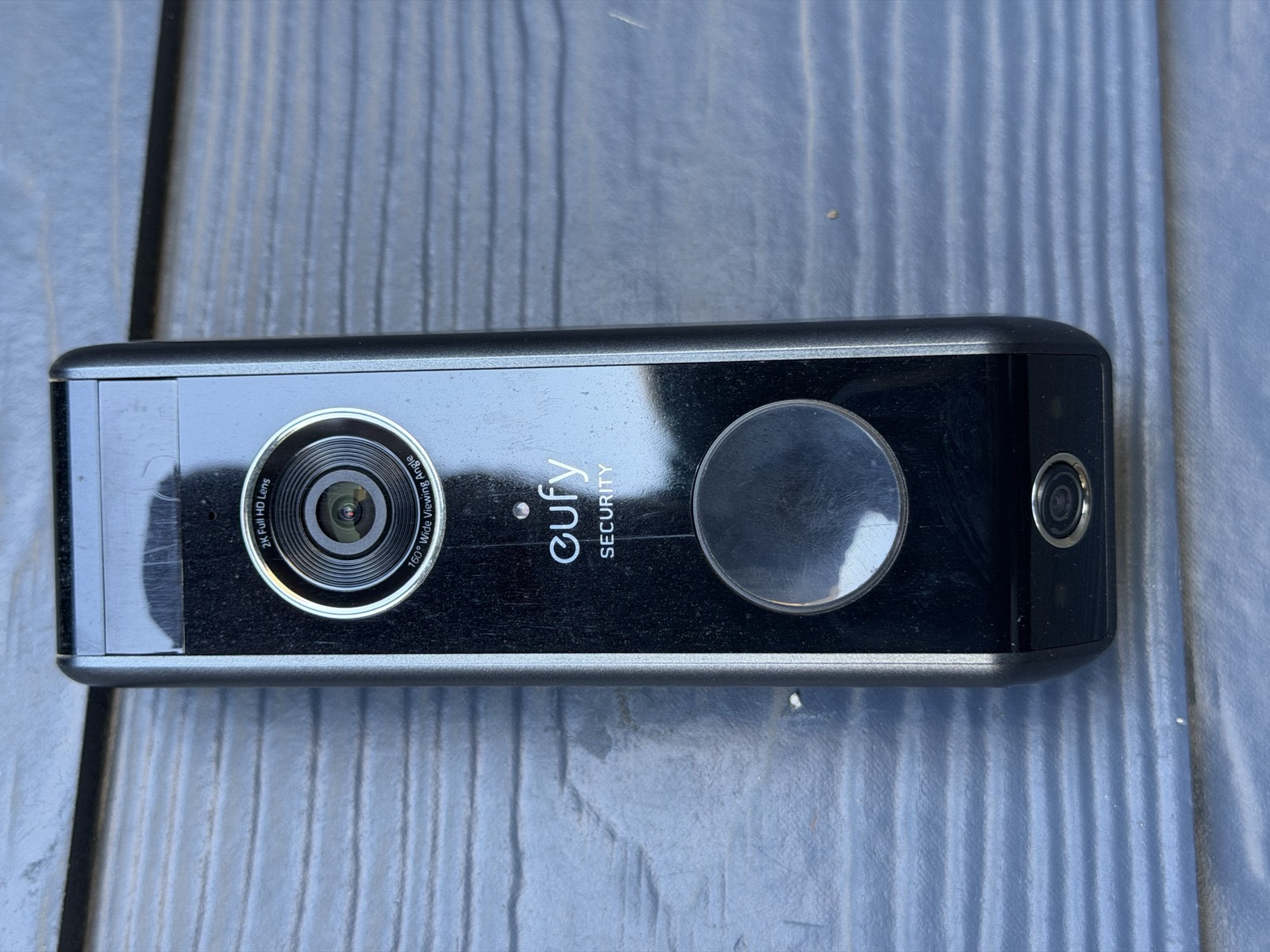
The second, smaller lens near the edge of the housing is what makes this a dual-cam doorbell rather than a standard single-lens one: the main lens covers the usual wide, tall field of view for greeting visitors, while the second lens angles down to keep the doorstep — and anything left on it — in frame, without the fisheye distortion a single ultra-wide lens would need to cover both jobs.
Open items
- The Encode Plus’s exact trim SKU and serial number, from the label under the battery cover.
- The Eufy HomeBase’s generation.
- The garage controller’s exact model number, and which Z-Wave hub or panel it is currently included on.
- The garage door opener’s own make and model.