02·ENE
Electrical & Energy
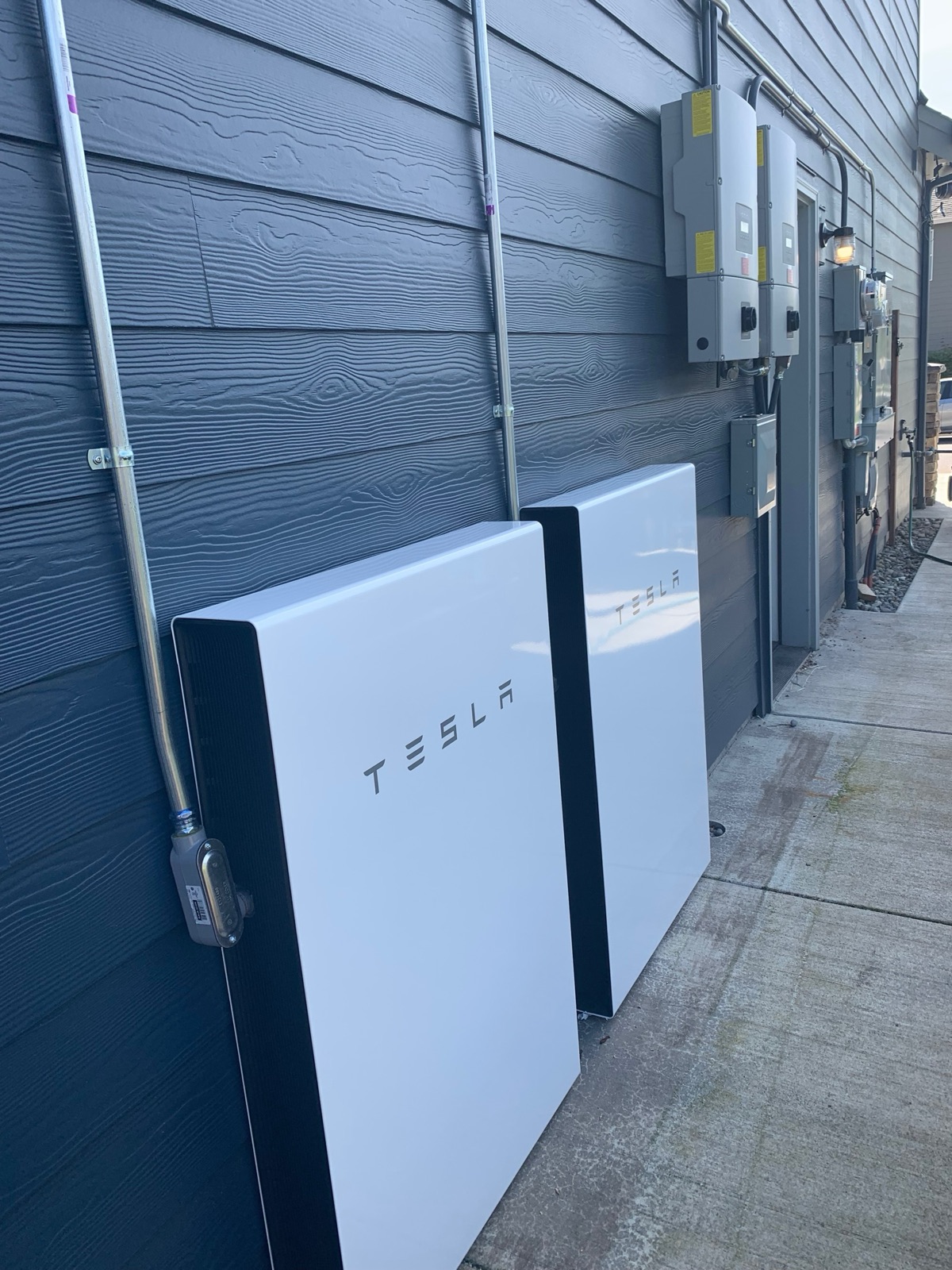
Rooftop solar, two Tesla Powerwalls and a Tesla gateway that carries the whole house through a power outage — automatically, with nothing for you to switch.
At a glance
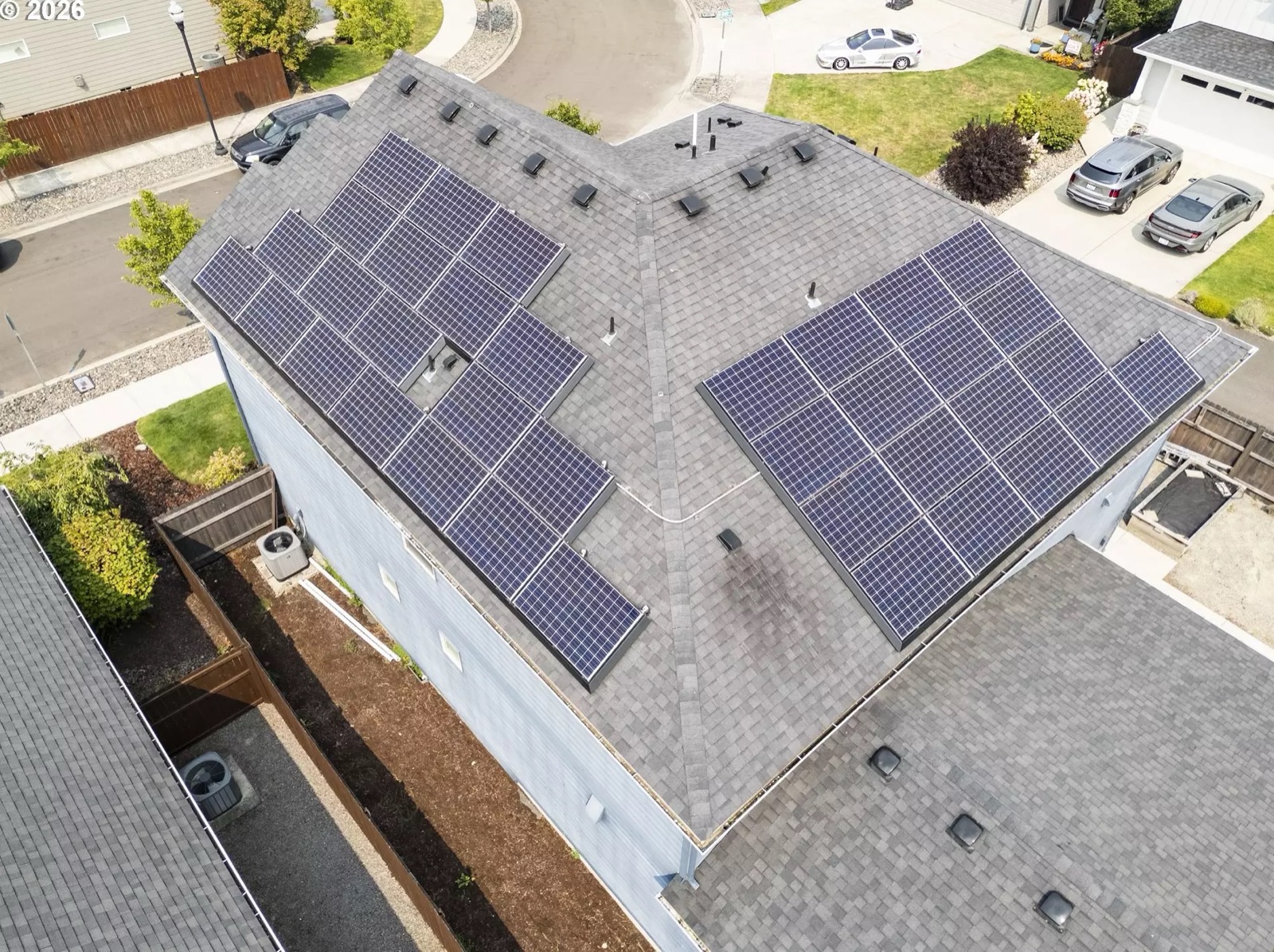
A rooftop solar array (36 panels) feeds two Delta inverters; two Tesla Powerwall batteries store what the house doesn’t use; a Tesla gateway ties solar, batteries and the utility grid together and provides whole-home backup. The grid connection is Clark Public Utilities.
- Where
- All of the equipment except the panels themselves is on one wall: the garage’s north wall, along the north side yard. Walk out of the garage man door and turn left and you pass the whole system in order — the main service and the meters and PV disconnects by the door, then, further along toward the rear corner and the raised beds, the two Delta inverters with the two Powerwalls at ground level beneath them beside a concrete pad. The array is on the roof above, visible from the corner of N 9th St & N Noble Loop.
- Must know
- In a power outage you do nothing. The gateway disconnects from the grid in a fraction of a second and the Powerwalls keep the house running — so seamlessly that the grid being down is usually news from a neighbor or the app rather than from anything in the house. Everything else — production, charge level, backup reserve — lives in the Tesla app.
- Status
- Installed and operating. Solar energized November 2018; Powerwalls added 2019. The system is owned outright — no lease, PPA, or solar loan — and it is part of the house. Powerwall generation, gateway model, serials and the breaker schedule are still to gather.
2Everyday use
This is the system people ask about most and touch least. It has no switches you operate, no schedule you set, and no seasonal ritual. It runs itself. What follows is what it is actually doing, so that the numbers in the app mean something to you.
How a day works
Think of the house as always drawing power from the cheapest available source, in this order:
- Morning. The sun comes up, the panels start producing, and that power goes to the house first — lights, fridge, hot water, whatever is running.
- Midday. Production exceeds what the house is using. The surplus charges the Powerwalls. Once they are full, the extra flows backwards through the meter to the utility and is credited to your account (see Deep dive — net metering).
- Evening. Production falls off. The house switches over to the Powerwalls and runs on stored sunshine instead of buying power.
- Overnight. When the Powerwalls reach the backup reserve you have set, they stop discharging and hold the rest in case of an outage. The house draws from the grid until the sun comes back.
Winter is different, and that is normal
The measured record is a page of its own
Reading the Tesla app
Everything is in the free Tesla app (iOS/Android), under the energy site for this address. Two screens matter:
- Power flow. A live diagram with four nodes — sun, house, battery, grid — and animated lines showing which way energy is moving right now. If the line from grid to house is dark and the line from battery to house is lit, you are running on stored solar. That is the whole story in one glance.
- Energy graphs. Day, week, month and year totals for what you produced, what you used, what you stored and what you sent to the utility. This is what you check once a month, not once an hour.
Backup reserve — the one setting you may actually change
Backup reserve is the percentage of battery you refuse to spend on normal evenings, held aside for outages. Set it low and you get maximum everyday savings but less cushion; set it high and you always have a deep reserve but you buy more power from the grid at night.
- Open the Tesla app and select this energy site.
- Go to the Powerwall / backup settings.
- Drag the Backup reserve slider to the percentage you want to keep in hand.
A sane starting point
Tesla’s published default backup reserve is 20%. Note that during a long outage the Powerwalls will discharge below the reserve if they have to — the reserve governs everyday cycling, not survival — and the system prioritizes getting back above it once power returns.
Storm Watch
Storm Watch is an automatic feature: Tesla monitors weather-service severe-weather alerts for this area, and when one is issued the system charges the Powerwalls to maximum capacity — from solar and, if needed, from the grid — so the house goes into the storm with as much stored energy as possible. It reverts to normal behaviour when the event ends. You do not have to do anything.
Storm Watch needs grid charging enabled
What an outage actually feels like
- Usually: nothing. No flicker, no blinking clocks, no devices resetting.
- The house keeps running. The Tesla app shows the grid line greyed out and the house running from the battery (and from solar, if it is daytime).
- When utility power returns, the gateway reconnects on its own and the Powerwalls begin recharging. Again, nothing for you to do.
The actual record, over years of outages
What to be sensible about during a long outage
3App
The system is managed with the Tesla app — the same app Tesla vehicle owners use. You do not need a Tesla vehicle to use it, and you do not need the app for the house to work. The app is monitoring and settings; the hardware runs regardless. Energy Performance shows what each screen produces; the everyday settings worth knowing — backup reserve, Storm Watch, Grid Charging — are in Everyday use above.
WiFi, and why the gateway wants it
The gateway reports to Tesla over the house WiFi. If you change the WiFi name or password (see the Network page), the gateway will go quiet in the app until it is reconnected — the house keeps running perfectly, you just lose remote visibility. Reconnecting is done through the Tesla app or the gateway’s own setup interface.
There is a second reason to keep it connected. The system takes its firmware updates over that connection, and Tesla’s Powerwall warranty is written around being able to reach the system to deliver them.
Warranty
- Powerwall: Tesla’s U.S. Powerwall limited warranty runs 10 years from the initial installation date and is transferable — an owner who provides proof of ownership can make claims under it.
- Solar panels: Tesla’s panel warranty runs 25 years and likewise transfers with the home to an owner who provides proof of ownership.
- The condition attached: Tesla states that if a Powerwall is offline for an extended period, or is not registered with Tesla, it may not be able to honour the full ten years — though it will honour at least four. The obligation is simply to keep the system registered and on WiFi, and it is free.
Owner's edition
Full details in the owner's edition — serial numbers, configuration and identity details continue in the complete manual, handed to the buyer at closing.
4Maintenance
The honest answer: there is very little to do, and most of what people imagine — washing panels, servicing batteries — is not worth doing here.
Solar panels
- Cleaning: mostly unnecessary in this climate. Western Washington gets enough rain often enough that rain does the job. Panels are glass at a tilt; dust does not accumulate the way it does in a dry climate.
- What does matter is organic growth. Fir needles, moss, and leaf litter from the surrounding conifers can collect at the lower edge of the modules and along the racking. That is worth looking at once a year — from the ground, with binoculars or a phone zoom.
- Do not walk the array. Standing on modules cracks cells invisibly and voids warranties, and this is a two-storey composition-shingle roof. If something needs to be cleared, hire a solar or roofing contractor with fall protection.
- Keep the gutters clear. Backed-up gutters and debris dams under the array’s lower edge are a roof problem long before they are a solar problem.
Powerwalls
- No routine maintenance. There is nothing to service, top up, or replace. Firmware updates arrive over the internet automatically.
- Leave them room to breathe. They are air-cooled and thermally managed. Do not stack storage, firewood, or bins against them, and do not enclose them.
- Do not pressure-wash them. They are rated for outdoor installation; they are not rated for a pressure washer aimed at the seams. Rinse or wipe with a hose and a cloth.
- They will be warm, and they will occasionally make a faint fan noise. Both are normal.
Inverters and the north-wall equipment run
- Keep the north side yard clear. Every enclosure on that wall — service, inverters, disconnects, meters, gateway — must stay accessible, and so must the Powerwalls at ground level beside the concrete pad. Code requires working clearance in front of them, and an electrician or a firefighter needs to reach them fast. This is a side yard with a gate, so it is also the natural place for bins, ladders and lumber to accumulate — don’t let them.
- Glance at the inverter displays occasionally. Each Delta inverter has a small screen and status LEDs (Power / Fault / Alarm). A steady fault light on one unit is the single most common reason production quietly halves — see Troubleshooting.
- Keep vegetation off. Shrubs and vines growing into the equipment wall trap moisture against enclosures and block the vents.
What to actually monitor
- Monthly: open the Tesla app’s energy graph and compare this month to the same month last year. A sudden year-over-year drop is the signal worth chasing; day-to-day variation is just weather.
- Annually: compare the year’s production against the design estimate in Specs (12,471 kWh/yr). Modules lose a fraction of a percent of output per year by design; a large gap means something is wrong, not aged.
- After any storm: a quick look at the app confirms the whole system came back. It normally does.
5Troubleshooting
The one hard rule
| Symptom | First checks | When to call someone |
|---|---|---|
| Production looks low | First ask whether it is the season: PNW output in November–January is a small fraction of June–August, and a heavy overcast day is a fraction of a clear one. Compare the same month year over year in the app rather than this week to last week. Then look for a physical cause: new shade from a growing tree, moss or needle build-up along the panel edges, snow. | If a like-for-like month is down sharply with no weather or shading explanation, get a solar service call — and mention which inverter (SOLAR 1 or SOLAR 2) looks wrong. |
| Production is roughly half what it should be | That is the classic signature of one of the two inverters being offline. Walk out of the garage man door, turn left, and look at both Delta inverter displays above the Powerwalls. One dark screen, or a lit Fault/Alarm LED on one unit while the other looks normal, settles it. | Call a solar service contractor. A single failed or faulted string inverter is a routine repair — but it will quietly cost you half your production for months if nobody notices. |
| Powerwalls are not charging | Check the app’s power-flow screen. If the batteries are already at 100%, nothing is wrong. If it is winter, there may simply be no surplus to store — the house is consuming everything the array makes. Also check that backup reserve is not set at or above the current charge level. | If it is a sunny day, the array is producing well above house consumption, and the batteries still sit at a low percentage without charging, that is a fault — call Tesla. |
| Power is out in the neighbourhood | Nothing to do. The gateway islands the house automatically. Confirm in the app that the grid node is greyed out and the house is running on battery. Then be selective about large loads for the duration. | If the house goes dark with the grid, that is a real fault — see the row below. |
| The grid goes out and so does the house | This should not happen with a healthy system. Check the Tesla app (on cellular data — the internet is probably down too). Do not start opening enclosures. | Tesla energy support, immediately. Note whether the Powerwalls show any status light. |
| The whole system is offline in the app | Almost always a network problem, not an energy problem. Confirm the house internet is up (Network page). The system keeps producing, storing and backing up perfectly while it is offline — you have simply lost the dashboard. | If the internet is fine and the site still will not report after a day, reconnect the gateway to WiFi; then Tesla support. |
| A breaker has tripped somewhere in the house | This is an ordinary electrical event and unrelated to solar. The panel is outside the garage’s north wall, two feet from the man door on the front side of it. Look for the breaker that is not aligned with its neighbours, push it fully off and then back on. | A breaker that trips again immediately is telling you something real. Stop, leave it off, and call an electrician. |
What a healthy inverter display looks like
Emergency shutdown
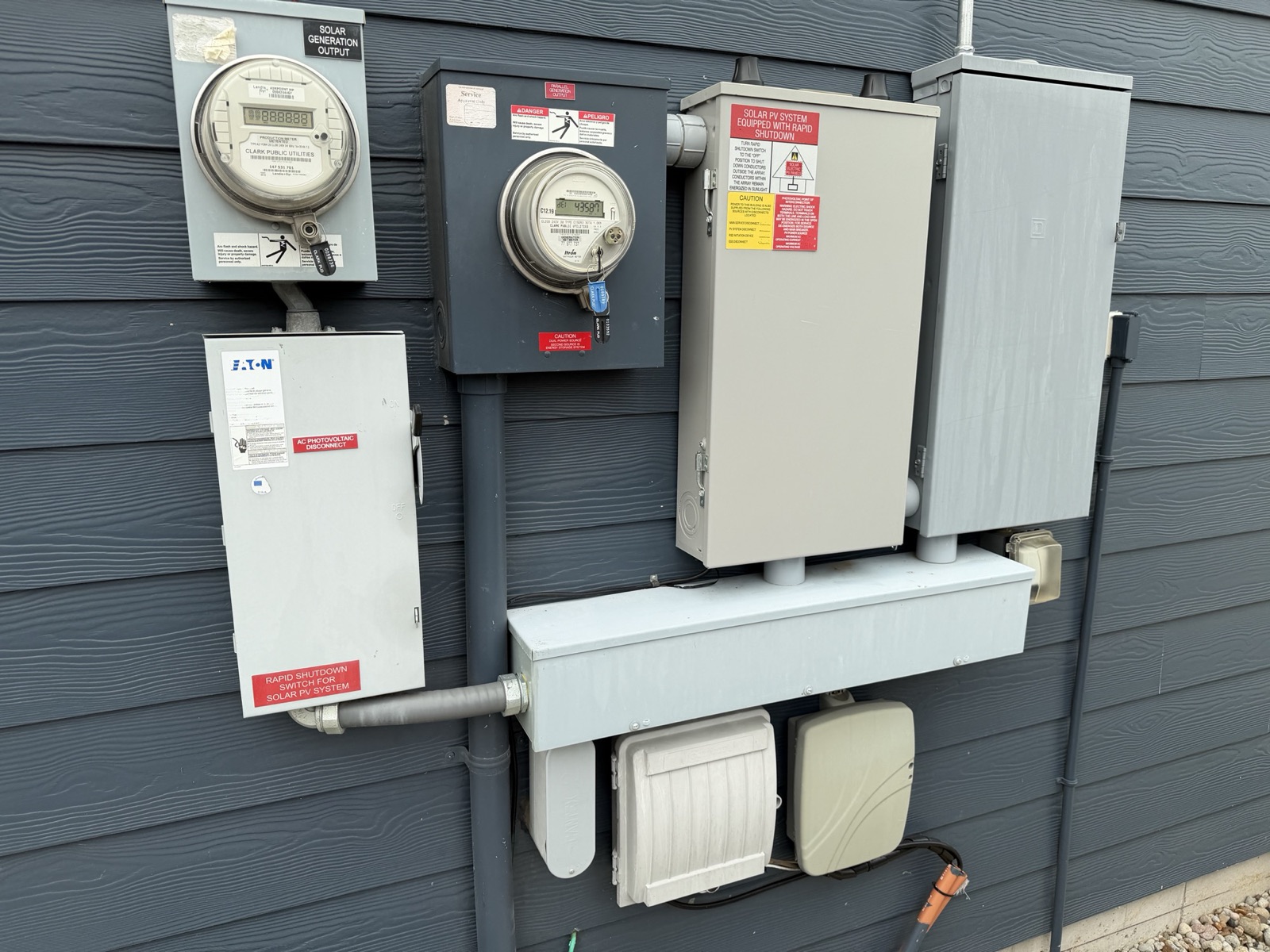
There is a labelled rapid shutdown switch for the solar PV system on the north wall — the Eaton safety switch below the production meter, a few feet from the garage man door, installed so that the fire service can de-energize the rooftop conductors from the ground. The same physical switch also carries a red AC photovoltaic disconnect placard on its door: one device doing both jobs, not two separate switches. The main electrical service — meter and panel — is on the same wall, about two feet from the man door on the front (west) side of it, so the service disconnect and the PV disconnect are within arm’s reach of each other.
When you would use it
The tan enclosure’s yellow caution placard was filled in by hand at commissioning and lists where four disconnects live: main service disconnect, PV system disconnect, RSD initiation device, and ESS disconnect. The RSD initiation device is the Eaton switch itself, which its own red placard states independently. One entry reads Garage for the main service disconnect. The other two blanks are hand-lettered and illegible in every photograph taken so far. To gather — a photograph of each disconnect with its label, so this page can name them exactly.
6Specs & identity
| Panel count | 36 modules, rooftop, laid out across two mounting planes; the main plane is visible from the corner of N 9th St & N Noble Loop |
|---|---|
| Permitted system size | 11.7 kW — the City of Ridgefield permit card for this address reads “11.7 KW SOLAR ROOF TOP” |
| Design estimate (annual) | 12,471.46 kWh/yr, 1,065.94 kWh/kW, 71.9% usage offset — from the PV engineering layout photographed during the build |
| Module make / model / wattage | to confirm at walkthrough — read a module label or the as-built documents. (11.7 kW across 36 modules works out to roughly 325 W each, which is consistent with the era, but the label is the answer, not the arithmetic.) |
| Energized | November 2018 (first array); array and battery buildout completed 2019 |
| Ownership | Owned outright — no lease, power-purchase agreement, or solar loan attached to the system. The array, both Powerwalls and the Wall Connector are part of the house. |
| Roof planes / racking layout | To gather — the engineering layout shows mounting planes MP1 and MP3 with rapid-shutdown devices and 3′ and 1′-6″ fire setbacks; photograph the as-built plan set |
| Type | Two Delta string inverters with integrated DC disconnects, wall-mounted on the garage’s north wall directly above the two Powerwalls, toward the rear of the north side yard |
|---|---|
| Labelling in place | Marked SOLAR 1 and SOLAR 2 — use these names when you call for service |
| Exact model | The nameplate’s top line reads SOLIVIA, then a number, then TL — Delta’s transformerless string-inverter line. The model-number digits are not resolvable in any photograph taken so far. To gather — a straight-on nameplate photo of each unit settles the exact model |
| String placard, SOLAR 2 (read from the install photo) | Max power-point current (Imp) ≈ 22.6 A · Max power-point voltage (Vmp) 250 V · Max system voltage 500 V · Short-circuit current (Isc) ≈ 30.2 A — re-read these in person; they were recovered from a photograph |
| String placard, SOLAR 1 | To gather — photograph the red placard on the left-hand unit |
| PV point of interconnection placard | Max AC operating current ≈ 31.7 A at 240 V (hand-lettered at commissioning). Confirm in person and reconcile against the 11.7 kW DC figure and the as-built one-line |
| Serial numbers | owner's edition |
| Batteries | Two Tesla Powerwall units, floor-standing, outdoors, side by side at ground level against the garage’s north wall, with the two Delta inverters and the disconnects mounted on the wall above them |
|---|---|
| Where to find them | In the north side yard, toward the rear (east) end, next to a concrete pad and a run of concrete walkway, with the raised garden beds immediately beyond them and the house’s north-east corner a few paces further on. Coming from the back lawn they are the first thing on the wall as you round that corner; coming from the front, walk through the side gate past the meters. Their exact station along the wall is estimated from the aerial, not measured |
| Powerwall generation | to confirm at walkthrough — the generation determines usable capacity and power rating, so this page deliberately quotes no kWh figure until it is read off the unit |
| Gateway | A Tesla gateway ties solar, batteries and grid together and performs the backup switching |
| Gateway model | to confirm at walkthrough — open the app’s system information or photograph the enclosure label |
| Backup scope | Whole-home backup |
| Serial numbers (Powerwalls, gateway) | owner's edition |
| Which loads are on backup | To confirm — whole-home is the design intent; verify specifically whether the EV charger and the largest 240 V loads are backed up or excluded |
| Electric utility | Clark Public Utilities |
|---|---|
| Metering | Two Clark Public Utilities meters side by side on the garage’s north wall beside the man door: a Landis+Gyr AIRPOINT HP, detented, production meter (labelled “Solar Generation Output” — detented means it can only register generation, never run backwards) and an Itron generation net meter (labelled “Parallel Generation Output”, ANSI C12.19). Both are Form 2S, Class 200, 240 V, 3-wire |
| Net metering | Clark PUD net metering (program cap 100 kW AC). Credits roll over monthly; unused credit is granted to the utility each March 31 (RCW 80.60.030) |
| Rapid shutdown | A single Eaton exterior safety switch below the production meter carries two red placards on the same door — “AC photovoltaic disconnect” and “Rapid shutdown switch for solar PV system.” It is one physical device doing both jobs, and it is the RSD initiation device the interconnection placard refers to |
| Main electrical service | Meter and panel, mounted on the outside of the garage’s north wall, about two feet from the garage man door on the front (west) side of it. Everything else on this page — production meter, net meter, PV and rapid-shutdown disconnects, then the inverters and the Powerwalls — is on the same wall, running back from there toward the rear corner. Full breaker schedule still to gather |
| Getting to it | Out through the garage man door and turn right for the service; turn left for the inverters and Powerwalls. From outside, in through the north side gate |
| Service size (amps) | to confirm at walkthrough — read the main breaker |
| Utility account number | To gather — the Clark Public Utilities account number for this service address, which every billing or net-metering query starts from |
| Meter numbers & serials | owner's edition |
| Net meter reading, Aug 5 2026 | Delivered-energy register (“dEl”) read 43,587 kWh — a datable usage baseline. The production meter’s LCD was mid self-test at the same moment, so no production total was captured |
| Permit numbers (City of Ridgefield) | To gather — the permit card is photographed but the number is not legible; the City can reissue records for this address |
| Installer of record | The permit card names a Washington State contractor, and the entry begins “TESL” — but the rest of the line is not legible. To gather — the exact entity, from the City’s permit record |
Exterior circuits and outlets
Four exterior provisions that are otherwise found by accident, or not at all. They are all on the east and front elevations, and none of them is obvious.
| Hot tub circuit | A fully installed, dedicated circuit for a hot tub — the box with the heavy cable low on the east wall of the main house body, near the corner. The circuit is 40 A, possibly 50 A — to confirm from the breaker. A tub can be set on the patio and connected without an electrician running a new circuit, which is the expensive part of the job. |
|---|---|
| Covered patio — two switched outlets | Under the covered patio ceiling there are two switched outlets: one in the far north-west corner, one in the far south-east. Their switch is just inside the sliding patio door, immediately beside the switch for the patio’s built-in lighting — two switches side by side, one for the outlets, one for the lights. |
| Front eaves — switched outlet | A matching switched outlet up by the eaves at the front of the house. Its switch is in the coat closet by the half bath on the first floor. |
| What they are for | Holiday lighting. Three ceiling- and eave-level outlets, each on a wall switch, mean festoon or Christmas lighting on the patio and across the front of the house goes up on a ladder once and is then switched on and off from indoors — no timer, no extension cord through a window, nothing to unplug in the rain. |
There is one more exterior provision, low-voltage rather than mains. A pair of ethernet cables hangs down at the corner on the east wall of the main house body (ignoring the living-room bump-out), directly above the hot-tub box — a camera drop, cabled and left ready. No camera is fitted to it. See Network and Security & access.
Working out which switch is which
Main panel breaker schedule
The main panel is the one place in this manual where a page of detail genuinely earns its keep — which breaker controls what, so that you are not flipping switches at 10 p.m. guessing. It is the last significant gap on this page.
Owner's edition
Full details in the owner's edition — serial numbers, configuration and identity details continue in the complete manual, handed to the buyer at closing.
Why this table is in the owner’s edition only
7Documents & links
Official Tesla, utility and state sources. These are the pages that actually answer questions about this system — archived locally in the owner’s edition so the manual works with no internet.
Tesla — operating the system
- Tesla — Powerwall support
The Powerwall support hub: operation, settings, troubleshooting. - Tesla — Powerwall owner documents
Owner’s manuals and datasheets by Powerwall generation. Download the one matching this house once the generation is confirmed. - Tesla — Powerwall 2 owner’s manual
For a Powerwall 2 installation. Archived locally — likely match; Powerwall generation is not yet serial-confirmed for this house. - Tesla — Powerwall 3 owner’s manual
For a Powerwall 3 installation. - Tesla — Powerwall 2 AC + Backup Gateway 2 installation manual (PDF)
Tesla does not publish a standalone Backup Gateway 2 manual — GW2 content is bundled into this combined installation manual. Archived via an archive.org capture (the live tesla.com link 403s). Series-level — replace once the exact gateway model is confirmed. - Tesla — Solar Panels System Manual (PDF)
Tesla’s general residential solar-panel system manual — covers the Tesla-branded array/install/warranty only, not the Delta/Solivia inverters. Series-level — replace once the exact array configuration is confirmed. - Tesla — Backup reserve
What the reserve slider does; Tesla’s default is 20%. - Tesla — Storm Watch
Automatic pre-storm charging. Requires Grid Charging to be enabled. - Tesla — the Tesla app for energy
The app itself: power flow, energy graphs, settings. - Tesla — Powerwall limited warranty (USA, PDF)
10 years from installation, transferable on proof of ownership. - Tesla — solar panel warranty (PDF)
25 years, transferable to a subsequent owner of the home.
Utility & regulatory
- Clark Public Utilities — solar net metering
The program page for the utility serving this address. - Clark PUD — net metering interconnection standards (2024, PDF)
The current technical and program standards. - Clark PUD — net metering agreement (PDF)
The agreement itself — including the March 31 annual credit true-up and the assignment clause. - Clark PUD — net metering checklist (PDF)
What the utility requires for an interconnection. Useful if you ever expand the array. - Clark PUD — service area maps
Clark PUD serves all of Clark County, including Ridgefield. (It does not supply water here — the City of Ridgefield does.) - Washington RCW 80.60 — Net metering of electricity
The Washington statute behind net metering. - RCW 80.60.030 — credits and the annual true-up
Monthly rollover, and the March 31 true-up at which unused credits go to the utility. - RCW 80.60.020 — program availability
Net metering is first-come, first-served until the earlier of June 30, 2029 or a 4%-of-1996-peak-demand cap. - City of Ridgefield
Where to request the solar and electrical permit records for this address (the permit card is photographed in the build archive, but its number is not legible).
Clark PUD net metering contacts: netmetering@clarkpud.com · (360) 992-3244 · ATTN: Energy Resources, Customer Generation, Clark Public Utilities, PO Box 8900, Vancouver WA 98668.
Section 8Technical reference ExpandCollapse
The engineering layer — for a buyer's technician, or a curious owner.
Written for anyone who wants to know how the house is actually wired, and for the electrician or solar tech they will eventually call. This is a conventional, well-executed AC-coupled retrofit: string inverters feeding an AC point of interconnection ahead of a Tesla gateway, with the gateway providing whole-home islanding.
The north wall, front to back
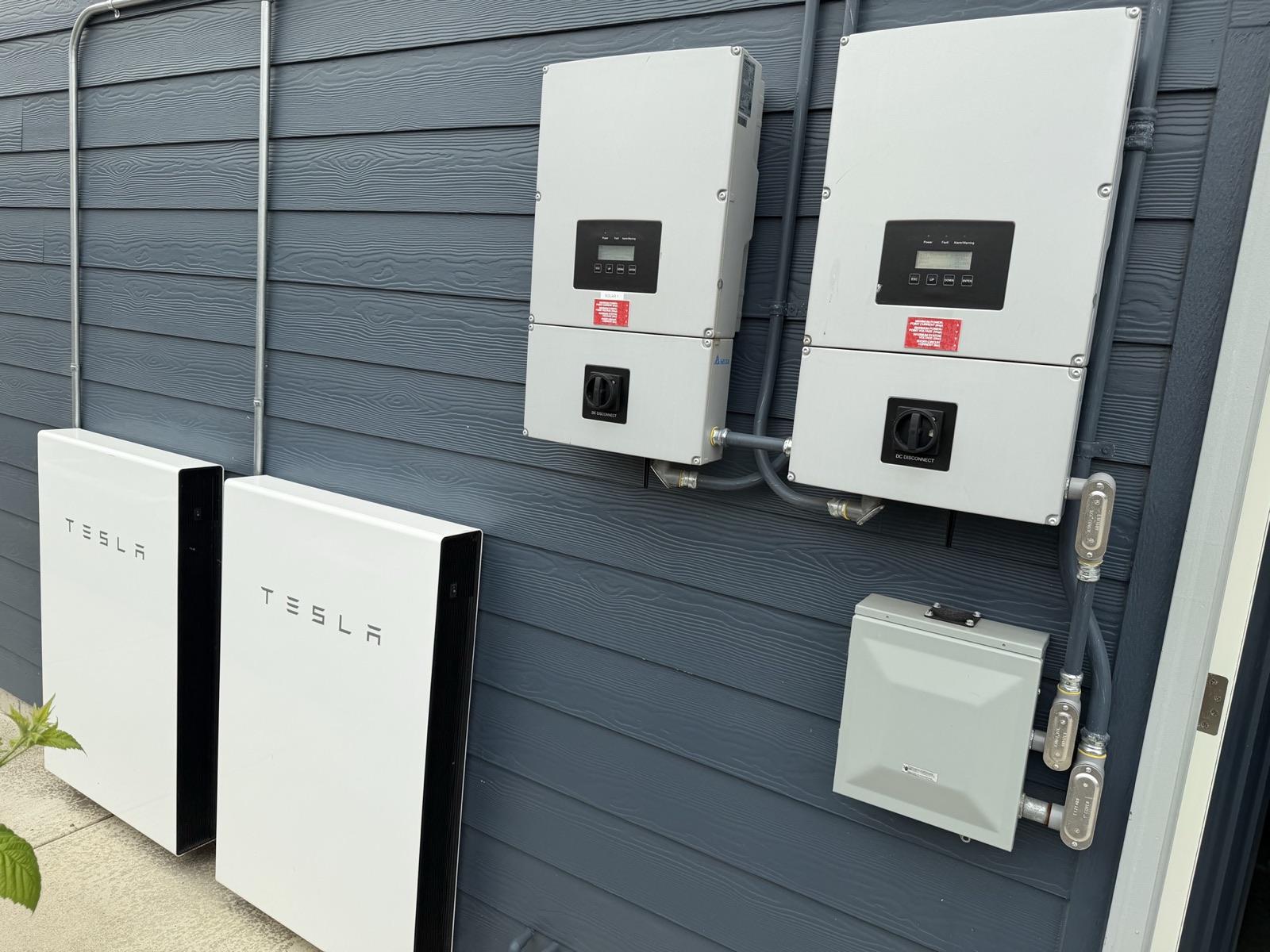
Everything lives on one exterior wall — the garage’s north wall, facing the north side yard — laid out along it in roughly the order the power flows. Nearest the front of the house, a couple of feet from the garage man door, are the main service, the two utility meters, the Eaton PV/rapid-shutdown disconnect and the tan interconnection enclosure. Further back toward the house’s north-east corner, beside a concrete pad with the raised garden beds just beyond, stand the two Powerwalls at ground level with the two Delta inverters and their DC disconnects on the wall above them. That is worth pointing out to anyone who works on the house: they can see the entire system, and every disconnect for it, walking twenty feet of one wall — with the main panel and the irrigation controller immediately on the other side of it, inside the garage.
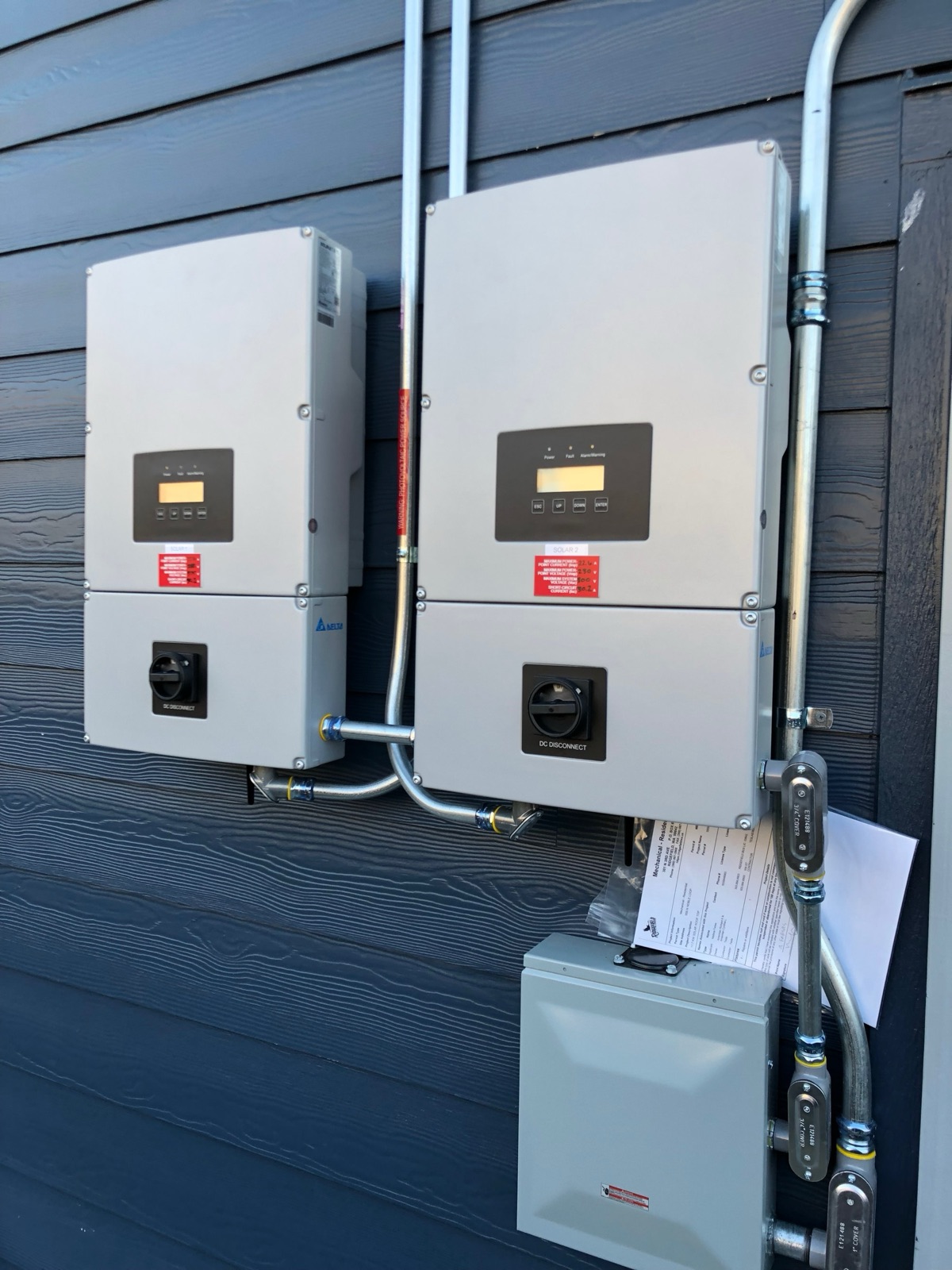
The nameplate names the inverter family, if not yet the exact model: the top line reads SOLIVIA, followed by a number and TL — Delta’s transformerless string-inverter line. The specific digits are not legible at any resolution available. To gather — a straight-on nameplate photo settles the exact model.
The meters and disconnects
Both utility meters name themselves precisely. The production meter (labelled “Solar Generation Output”) is a Landis+Gyr AIRPOINT HP, detented — meaning it can register generation only and cannot run backwards — Form 2S, Class 200, 240 V, 3-wire, Clark Public Utilities. Beside it, the net meter (labelled “Parallel Generation Output”) is an Itron ANSI C12.19 watt-hour meter, also Form 2S / Class 200 / 240 V, which nets what the house imports against what it exports.
Owner's edition
Full details in the owner's edition — serial numbers, configuration and identity details continue in the complete manual, handed to the buyer at closing.
A separate red label on the net-meter enclosure reads “Caution — dual power source — second source is energy storage system” — the utility’s own equipment calling out the two Powerwalls by function. The tan enclosure beside the meters carries the full NEC 690/706 placard set: a red banner (“Solar PV system equipped with rapid shutdown”), a white conductor-warning panel, the yellow caution panel with the four disconnect-location blanks discussed above, and a red point-of-interconnection warning panel whose own handwritten AC current/voltage values are too faded to read reliably.
Where the main service is
The other wall: what was run to the back of the house
The east elevation — the covered patio, the back lawn, the raised beds — carries provisions that were put in during the build and then, in the way of these things, never used. They are worth knowing about because each one is the expensive half of a job somebody would otherwise quote you for.
- A hot tub circuit, already installed. A box with a heavy cable sits low on the east wall of the main house body, near the corner, on a dedicated 40 A circuit (possibly 50 A — read the breaker). Running a dedicated 240 V circuit to the back of a house is the part of a hot tub installation that costs real money and involves trenching or fishing walls; here it is done, terminated, and a few feet from the patio slab.
- Three switched exterior outlets. Two under the covered patio ceiling — far north-west and far south-east corners — on a switch just inside the sliding patio door, next to the patio lighting switch; and one up by the eaves at the front, switched from the coat closet by the first-floor half bath. This is a deliberate holiday-lighting provision, and it is invisible unless somebody tells you.
There is also a low-voltage drop at the same corner: a pair of ethernet cables hanging at the corner of the east wall of the main house body, directly above the hot-tub box, run for a security camera and left ready. Nothing is fitted to it. The rest of the low-voltage picture is on the Network page, and the dormant alarm system on Security & access.
None of this needs an electrician to use. The hot tub circuit does — connecting a tub to it is licensed work, and the breaker rating has to be matched to the tub — but the wall switches and the outlets behind them are simply there, waiting to be found.
The engineering layout
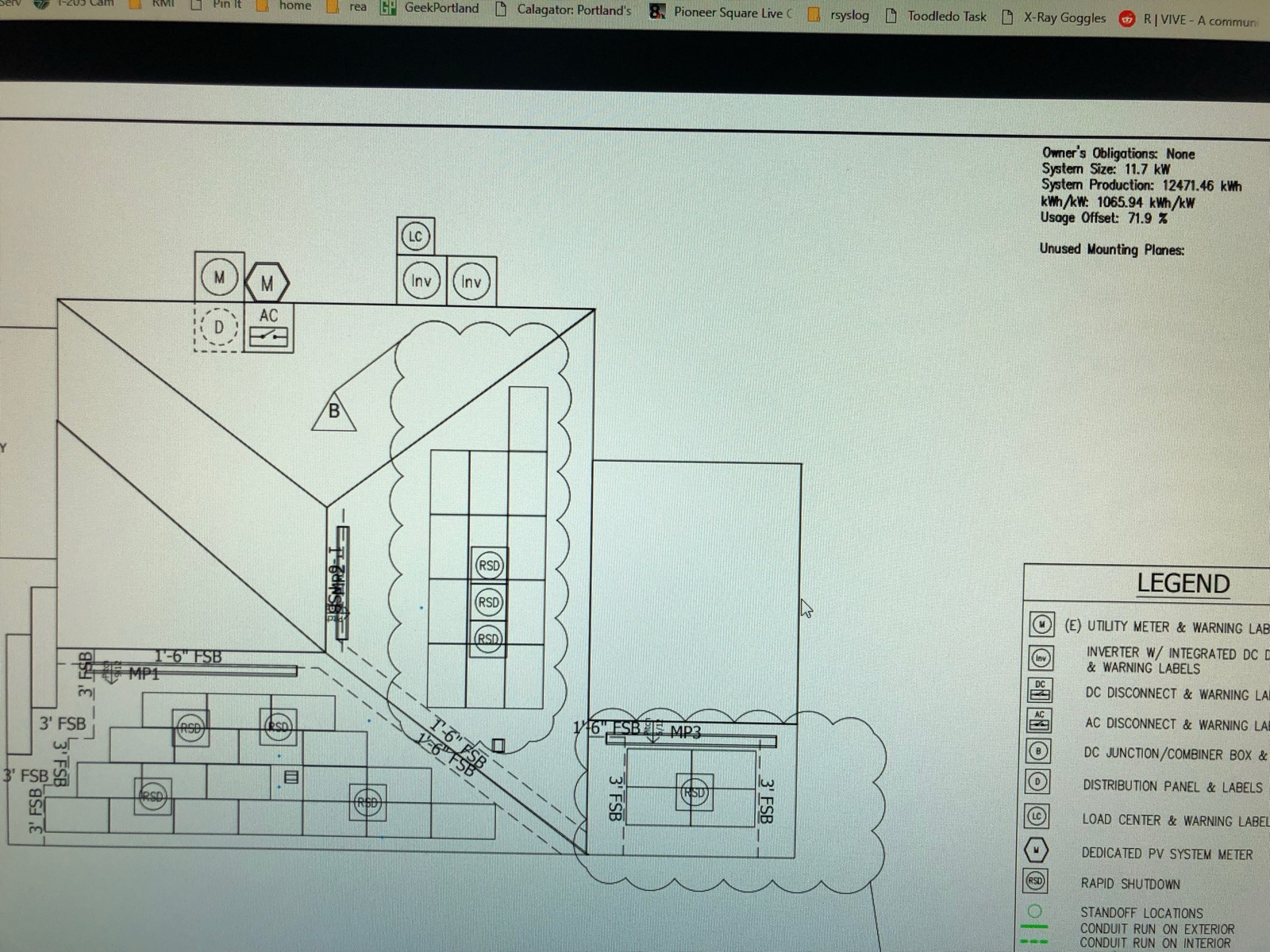
The layout shows two mounting planes (MP1 and MP3) with module-level rapid-shutdown devices, 3′ and 1′-6″ fire setbacks, a DC junction/combiner box, two inverters with integrated DC disconnects, an AC disconnect, a load center, the existing utility meter and a dedicated PV system meter — which is exactly what is on the wall today. The as-built plan set should be obtained and archived; this is a photograph of a screen, not a document.
One-line, in words
Rooftop modules on two mounting planes, with module-level rapid-shutdown devices, feed DC down into the two Delta string inverters (each with an integrated DC disconnect) at the rear of the north wall. Inverter AC output runs forward along that wall to an Eaton AC photovoltaic disconnect — the same switch carrying the rapid-shutdown placard — then through the dedicated solar generation output production meter, to the PV point of interconnection at the Tesla gateway. The gateway sits between the utility service and the house’s main panel and is what makes backup possible. The two Powerwalls, standing beneath the inverters, connect to the gateway.
The PV interconnection placard is hand-lettered ≈31.7 A at 240 V, which is 7.6 kVA of AC output capacity, against a permitted 11.7 kW DC array. That is a high DC-to-AC ratio, so it is worth reconciling against the as-built one-line and the inverter nameplates before anyone sizes a repair or an expansion — the placard and the permit are two different documents written at two different moments in a two-phase build (array 2018, batteries 2019). Confirm from the as-built plan set.
How backup switching actually works
A grid-tied solar array on its own cannot power a house during an outage. That surprises people, and it is worth understanding, because it is exactly the problem the gateway and the batteries solve.
- Anti-islanding. A normal grid-tied inverter is required by interconnection standards to shut down the instant the grid disappears. If it did not, it would keep energizing the utility’s conductors — and the lineworker who thinks the circuit is dead would find out otherwise. So without a battery system, solar goes dark exactly when you want it.
- The gateway is a fast transfer switch with a brain. It monitors the utility connection continuously. When the grid fails, it physically opens the connection to the utility, isolating the house — creating a deliberate, safe island.
- The Powerwalls form the grid. Inside the island, the Powerwall inverters become the voltage and frequency reference — they are the grid now. This happens fast enough that in practice nothing in the house reacts — one perceptible flicker, across years of outages, is the whole record.
- Solar rejoins. Because there is now a stable AC waveform to synchronize to, the Delta inverters can restart and produce into the island. That is the real payoff of pairing solar with batteries: during a multi-day outage the array recharges the Powerwalls each day, so the house is not simply spending down a fixed reserve.
- Curtailment. When the batteries fill during an outage and the house cannot use everything the array is making, the system sheds surplus solar — typically by shifting frequency slightly so the string inverters throttle back. Nothing is wrong when you see this.
- Reconnection. When utility power returns and stays stable for a qualifying interval, the gateway closes back onto the grid and normal operation resumes automatically.
Whole-home backup has one honest caveat
Net metering and what happens to exported power
The house is interconnected with Clark Public Utilities under Washington’s net-metering framework (RCW 80.60). The mechanics that matter to an owner:
- Netting. Power exported to the grid is credited against power imported; you are billed on the net. There are two meters on the equipment wall precisely so both directions and the raw solar production are measured.
- Monthly rollover. If you export more than you import in a billing period, the excess kilowatt-hours are credited and appear on the following period’s bill (RCW 80.60.030(3)(b); Clark PUD’s net metering agreement §2(c)(ii)). This is what makes a July surplus useful in December.
- Annual true-up: March 31. Both the statute and Clark PUD’s own agreement are explicit — on March 31 of each year, any unused kilowatt-hour credit accumulated over the preceding April 1–March 31 program year is granted to the utility with no compensation. Credits do not accrue forever, and they are never cashed out.
- So the system is sized to offset, not to sell. The design estimate for this array is a 71.9% usage offset — deliberately under 100%. That is the correct design under this rule: a system that over-produces annually simply donates the surplus every March.
- Program cap. Clark PUD net-meters systems up to 100 kW AC; this array is nowhere near that, so there is headroom if the array is ever expanded. Washington’s program itself is first-come, first-served until the earlier of June 30, 2029 or the point at which the utility’s cumulative net-metered capacity reaches 4% of its 1996 peak demand (RCW 80.60.020) — an existing interconnected system is what you want to be on the right side of.
- The agreement is held by the customer of record. Net metering here runs under a Clark PUD net-metering agreement tied to the electric account for this address, and its terms bar the customer from assigning its rights without the utility’s written consent. Anything to do with the agreement itself, or with a credit balance, goes to the utility’s net-metering desk rather than to Tesla — contact details below. Putting the agreement into a new name is a one-time step; see the Appendix — Taking Ownership.
Rapid shutdown
The array carries module-level rapid-shutdown devices (visible as RSD symbols throughout the engineering layout) plus the exterior initiator switch on the equipment wall. This is the NEC requirement that lets the fire service de-energize the conductors on and near the array from ground level. Do not remove or relabel the placards; they are what a responding crew reads.
What to gather to finish this page
Owner's edition
Full details in the owner's edition — serial numbers, configuration and identity details continue in the complete manual, handed to the buyer at closing.